[VORTEX Portal] How can I set up alarm notifications for VORTEX Connect system events?
20 Aug 2026
357 views
Question:
What should I do if I want to set up alarm notifications for VORTEX Connect System events?
Answer:
To set up alarm notifications VORTEX Connect System events, please follow the steps below to complete the configuration.
Note: Only accounts with organization owner or administrator privileges can set up alarm management.
Step 1. Add Alarm Notifications on the VORTEX organization
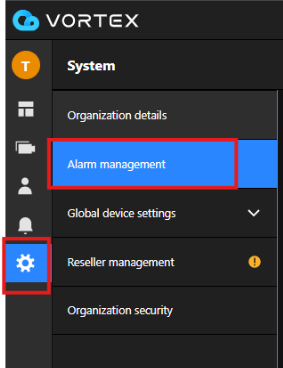
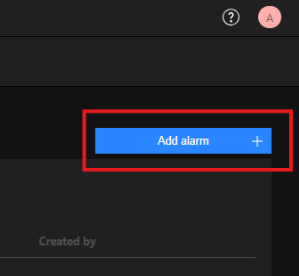
After adding the NVR to your VORTEX organization, click on “System > Alarm management > Add alarm” in sequence to configure the settings.
Step 2. Select which event types that will trigger an alarm
Select "General system events" and "NVR system events," then click "Next."
Step 3. Select which sources will trigger an alarm
After clicking "Select sources" to choose the sources that initiate Device & System events, click "Next."
Note: To receive notifications for "NVR channel online/offline" and "Device online/offline," you must select both the NVR device and camera devices, as shown in the pictures below.
Step 4. Select what actions to do when alarm trigger
After selecting the actions to take when the alarm is triggered, choose the recipients for those actions and click "Next."
Note: Only users within this organization can be assigned as recipients.
Step 5. Schedule when the alarm should occur
Schedule when the alarm should be triggered, as shown in the picture below, and then click "Next."
Step 6. This is a brief summary of your alarm, you can also give your alarm a desirable name
Review the "Summary" to confirm that the alarm settings are correct. If everything looks good, click "Add" to successfully set the alarm.
Was this article helpful?
Bu bilgiler sorununuzu çözmeye yardımcı oldu mu?
Thanks for your feedback!
Still need help?
Uzman ekibimiz size yardımcı olmak için burada.