TP Link - Tapo - How can I find the IP address of my Tapo camera?
20 Aug 2026
315 views
Method 1: Via Tapo app
1. On the home page, tap on your camera model card or tap Camera Preview > Manage to go to Live View page.
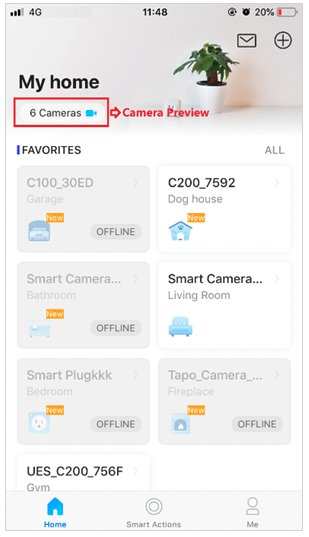
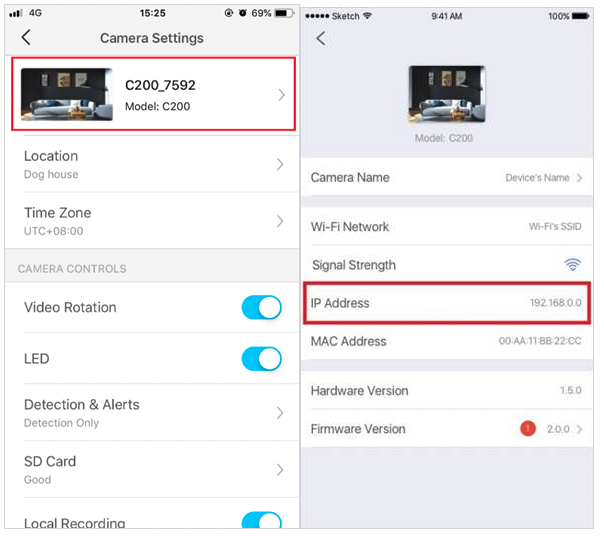
2. On the Live View page, tap the gear icon to enter the Camera Settings page.

3. Tap your camera model and then you can find the IP address of your camera.
Method 2: Via the web management page of your router
Here we take TP-Link router Archer C7 as an example.
1. Log in to the management page of your main router.
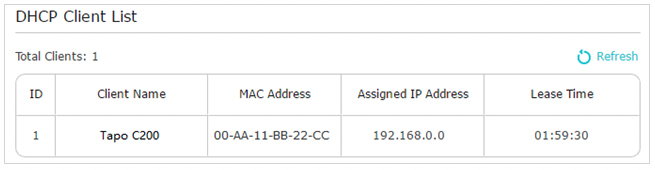
2. Go to Advanced > Network > DHCP Server and locate the DHCP Client List section to find the IP address of your camera.
Get to know more details of each function and configuration please go to Download Center to download the manual of your product.
Was this article helpful?
Bu bilgiler sorununuzu çözmeye yardımcı oldu mu?
Thanks for your feedback!
Still need help?
Uzman ekibimiz size yardımcı olmak için burada.