[Shepherd2] Failed to create OpenGL context for format QSurfaceFormat...
20 Aug 2026
315 views
DESCRIPTION
When trying to run the Shepherd 2 on a server we get this error message.
Is there a way of disabling the graphics adapter requirements of the Shepherd2 as the server seem to not have the required graphics adapter support.
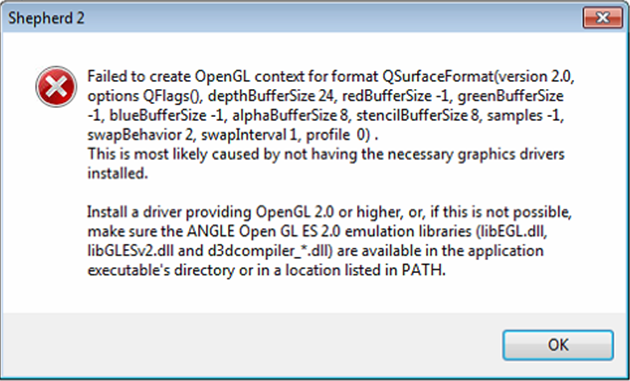
Is there a way of disabling the graphics adapter requirements of the Shepherd2 as the server seem to not have the required graphics adapter support.
ROOT CAUSE
Shepherd2 is required to use OpenGL to draw the program layout.
For most of computer with the latest graphic card driver, it could support OpenGL.
For some did not support OpenGL, customer could use Windows built-in DirectX(ANGLE library) instead.
However, using DirectX is not default behavior of Sheperd2.
Customer needs to add new environment variables QT_OPENGL=angle into system to let shepherd2 use DirectX.
For most of computer with the latest graphic card driver, it could support OpenGL.
For some did not support OpenGL, customer could use Windows built-in DirectX(ANGLE library) instead.
However, using DirectX is not default behavior of Sheperd2.
Customer needs to add new environment variables QT_OPENGL=angle into system to let shepherd2 use DirectX.
SOLUTION
For Windows 10:
1. From the Desktop, right-click the very bottom left corner of the screen to get the Power User Task Menu. From the Power User Task Menu, click System.
For Windows 7:
1. Click the Start button, right-click the Computer option in the Start menu, and select Properties.
2. Click the Advanced System Settings link in the left column.
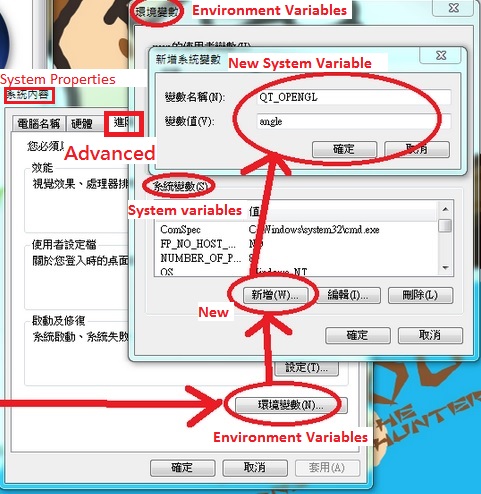
3. (Please refer following figure) In the System Properties window, click on the Advanced tab, then click the Environment Variables button near the bottom of that tab.
4. In the Environment Variables window (pictured below), create a new environment variable, click New.
5. Enter the variable name = QT_OPENGL and variable value= angle to let shepherd2 use DirectX.
1. From the Desktop, right-click the very bottom left corner of the screen to get the Power User Task Menu. From the Power User Task Menu, click System.
For Windows 7:
1. Click the Start button, right-click the Computer option in the Start menu, and select Properties.
2. Click the Advanced System Settings link in the left column.
3. (Please refer following figure) In the System Properties window, click on the Advanced tab, then click the Environment Variables button near the bottom of that tab.
4. In the Environment Variables window (pictured below), create a new environment variable, click New.
5. Enter the variable name = QT_OPENGL and variable value= angle to let shepherd2 use DirectX.
Was this article helpful?
Bu bilgiler sorununuzu çözmeye yardımcı oldu mu?
Thanks for your feedback!
Still need help?
Uzman ekibimiz size yardımcı olmak için burada.