Setup - VSPlayer
20 Aug 2026
415 views
VSPlayer Installation Setup
Step 1. Download the VSPlayer application most appropriate for your operating system here
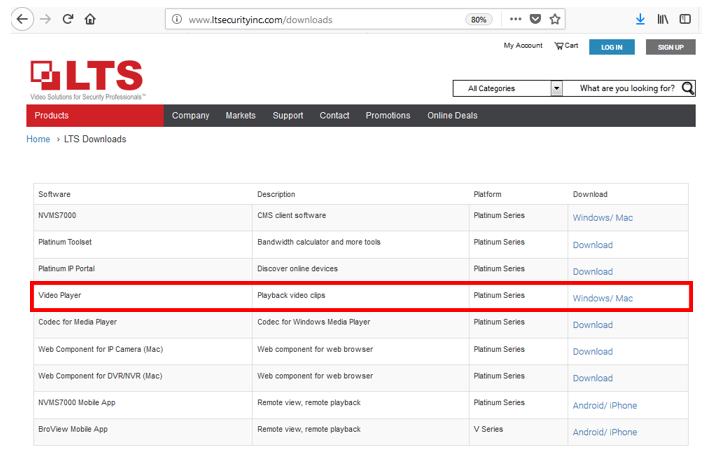
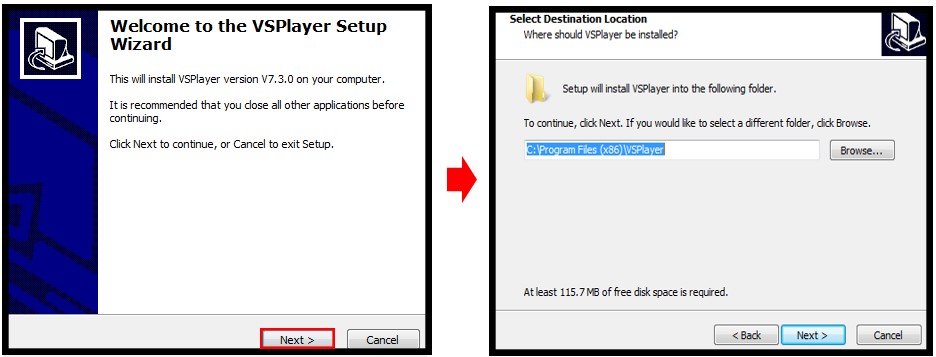
Step 2. Open the file's folder wherever you downloaded it to onto your personal computer and double click the setup file.

Step 3. At the setup, proceed by clicking "Next" and continuing until you have finished the installation.
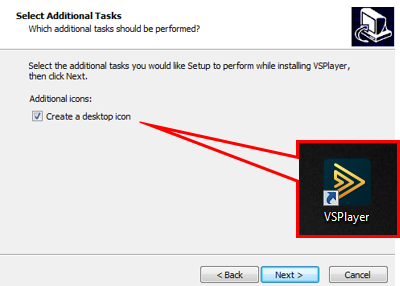
Step 4. The VSPlayer should now be installed and a shortcut will be made on your desktop if you left the "create a desktop icon option" checked.
Was this article helpful?
Bu bilgiler sorununuzu çözmeye yardımcı oldu mu?
Thanks for your feedback!
Still need help?
Uzman ekibimiz size yardımcı olmak için burada.