Preview - Control Bar
20 Aug 2026
496 views
Move the mouse to the top center of the video of current channel, the control bar will show up.
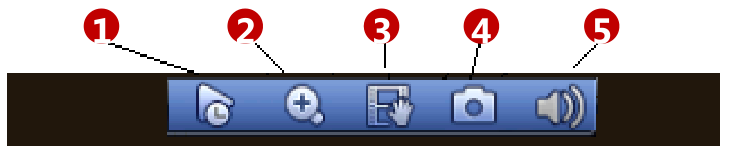
- Realtime Play: It is to replay the previous 5-60 minutes record of current channel. Main menu->Setting->General to reset real-time playback time.
- Zoom: Click the button and select an interested region to view the zoomed in image, or just point the cursor to the interested point and scroll up and down.
- Remote Device: Click it to go to the remote device interface to add/delete remote device or view its
corresponding information. - Realtime Backup: It is to backup the video of current channel to the USB device. Click button , system begins recording. Click it again, system stops recording.
- Audio Talk: Click the button to enable the bidirectional talk function, which will cancel bidirectional talk of other IP channels temporarily.
Was this article helpful?
Bu bilgiler sorununuzu çözmeye yardımcı oldu mu?
Thanks for your feedback!
Still need help?
Uzman ekibimiz size yardımcı olmak için burada.