(PC) - IP Configuration Tools
20 Aug 2026
416 views
| Sapphire Config Tool | Discover online devices | Sapphire Series | Windows |
| EmPower Config Tool | Discover online devices | EmPower Series | Windows |
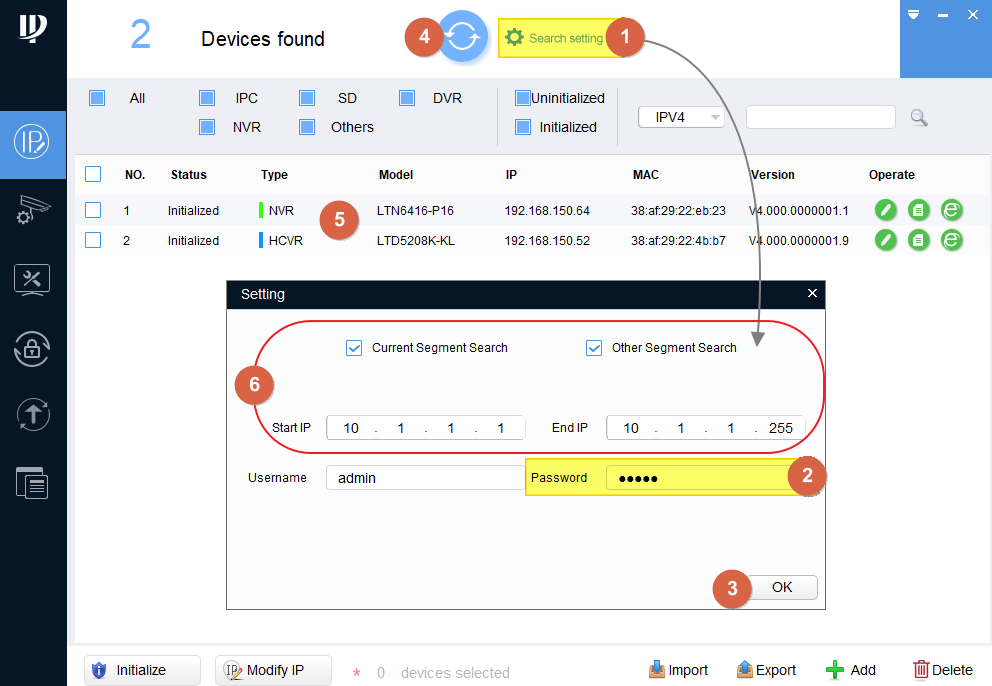
- After running the software. Click the Search setting first.
- Make sure enter the correct admin password in here.
- click OK
- Click Refresh, it will search the Local Network and find the devices.
- The result should listed in here.
- If the result is not showing. Please select other Segment Search and specify the IP range.
Then, OK, Refresh it again until you can see the device.
The IP camera default IP address is 192.168.1.108
Was this article helpful?
Bu bilgiler sorununuzu çözmeye yardımcı oldu mu?
Thanks for your feedback!
Still need help?
Uzman ekibimiz size yardımcı olmak için burada.