LTCMIP7923LPR-22 Parameter Setting Guide
20 Aug 2026
295 views
Step1: Login camera on web
Step2: Enter Configuration page
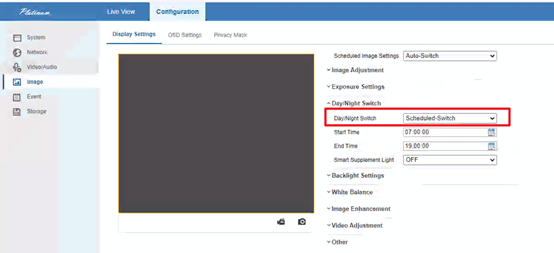
Step3: Click Image->Display Settings->Day/Night Switch
Step4: Select Scheduled- Switch Mode as shown below, set the Start Time and End Time, then camera will stay in night mode during this time.
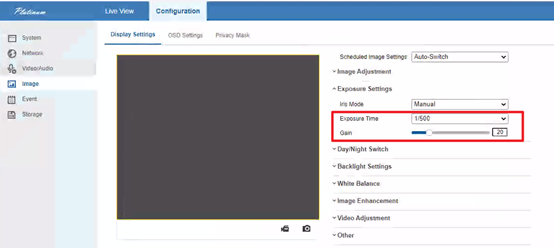
Step5: Click Exposure Setting, set 1/500 for exposure time and 20 for Gain.
Step6: Check if the license plate can be seen clearly in night.
Was this article helpful?
Bu bilgiler sorununuzu çözmeye yardımcı oldu mu?
Thanks for your feedback!
Still need help?
Uzman ekibimiz size yardımcı olmak için burada.