How to unbind your NVR from the Speco Blue app
20 Aug 2026
405 views
STEP 1:
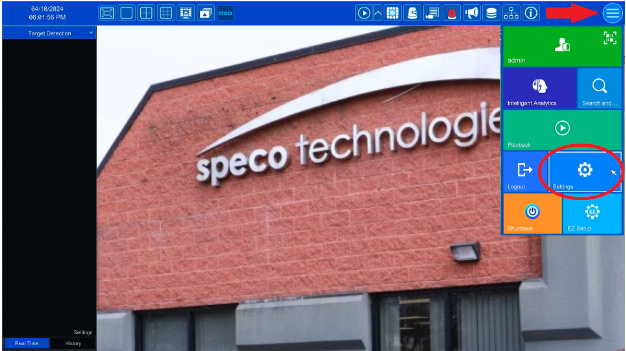
- Go to the Hamburger menu in the upper right corner (marked with an red arrow in the image below)
- Click on Settings (Circled below)
STEP 2:
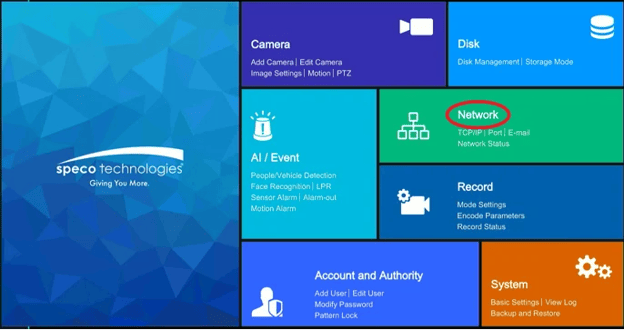
- On the next page choose Network (circled below)
STEP 2:
-
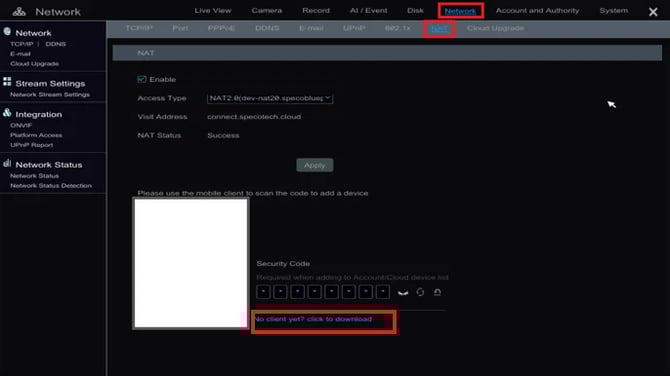
- Click on the NAT tab.
- The Binding feature can be found under the QR code.
- Here the NVR can be unbound, so that other accounts will be able to connect to it using the Speco Blue App.
Initial Publish Date: October, 22nd, 2024

Published by: Armand Juliani, Tier 1
STEP 1:
- Go to the Hamburger menu in the upper right corner (marked with an red arrow in the image below)
- Click on Settings (Circled below)
STEP 2:
- On the next page choose Network (circled below)
STEP 2:
-
- Click on the NAT tab.
- The Binding feature can be found under the QR code.
- Here the NVR can be unbound, so that other accounts will be able to connect to it using the Speco Blue App.
Initial Publish Date: October, 22nd, 2024

Published by: Armand Juliani, Tier 1
Was this article helpful?
Bu bilgiler sorununuzu çözmeye yardımcı oldu mu?
Thanks for your feedback!
Still need help?
Uzman ekibimiz size yardımcı olmak için burada.