How to Refresh Camera Channels in Speco Blue VMS
20 Aug 2026
418 views
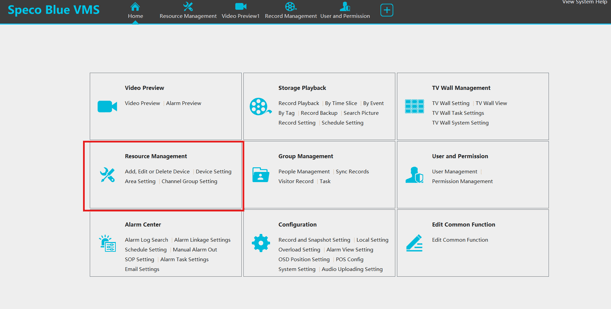
Step 1: Resource Management
- Click on Home > Resource Management
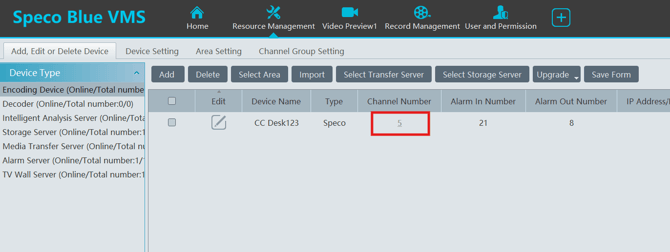
Step 2: Channel Number
- Under Channel Number, Click on the Channel Number itself
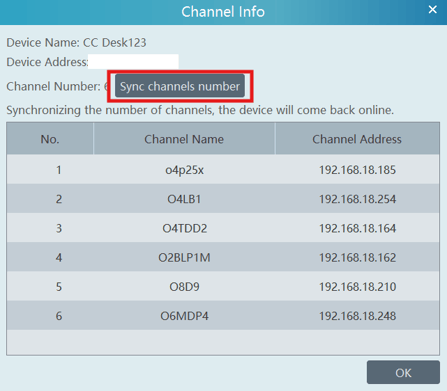
Step 3: Channel Info
- In the Channel Info window there will be an option to click "Sync Channel Number"
- Clicking this is will update this recorders current channels in your Speco Blue VMS
- The device will disconnected and reconnect quickly
- Note: If there have been no changes to the recorder, this box will not appear
Initial submission Date: November 20, 2024
Article Authored by: Christopher Cataldo, Tier 1
Step 1: Resource Management
- Click on Home > Resource Management
Step 2: Channel Number
- Under Channel Number, Click on the Channel Number itself
Step 3: Channel Info
- In the Channel Info window there will be an option to click "Sync Channel Number"
- Clicking this is will update this recorders current channels in your Speco Blue VMS
- The device will disconnected and reconnect quickly
- Note: If there have been no changes to the recorder, this box will not appear
Initial submission Date: November 20, 2024
Article Authored by: Christopher Cataldo, Tier 1
Was this article helpful?
Bu bilgiler sorununuzu çözmeye yardımcı oldu mu?
Thanks for your feedback!
Still need help?
Uzman ekibimiz size yardımcı olmak için burada.