How to download and use the Speco Access Control Smart IP Finder tool
20 Aug 2026
369 views
- To access Smart IP Finder, locate it on the USB thumb drive that came with the panel and install it on a PC connected to the local network used by the controllers.
- Alternatively, you can download it here
- Connect the access controller to the to local network.
- Run Smart IP Finder.
- This will scan the local network and find active controllers
- This will scan the local network and find active controllers
-png-2.png?width=670&height=401&name=1%202%20(1)-png-2.png)
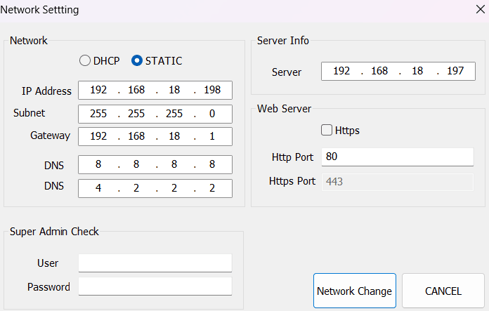
- From the Smart IP Finder tool you can:
- Set Static vs. DHCP
-
- Set port information
-
- Factory Default controller
-
- Assign controller to a server
-
- Change and edit licensing
- Change and edit licensing
For more info on setting up your panel for the first time,
reference the Quick start guide here.
Initial submission Date: July 9, 2025

Article authored by: Phil Benanti, Tier 2

Article revised by: Christopher Cataldo, Technical Support Lead
- To access Smart IP Finder, locate it on the USB thumb drive that came with the panel and install it on a PC connected to the local network used by the controllers.
- Alternatively, you can download it here
- Connect the access controller to the to local network.
- Run Smart IP Finder.
- This will scan the local network and find active controllers
- This will scan the local network and find active controllers
- From the Smart IP Finder tool you can:
- Set Static vs. DHCP
-
- Set port information
-
- Factory Default controller
-
- Assign controller to a server
-
- Change and edit licensing
- Change and edit licensing
For more info on setting up your panel for the first time,
reference the Quick start guide here.
Initial submission Date: July 9, 2025

Article authored by: Phil Benanti, Tier 2

Article revised by: Christopher Cataldo, Technical Support Lead
Was this article helpful?
Bu bilgiler sorununuzu çözmeye yardımcı oldu mu?
Thanks for your feedback!
Still need help?
Uzman ekibimiz size yardımcı olmak için burada.