Genetec: AV camera shows offline in the Server but can be pinged. AVIPU cannot discover it. Webpage will not load
20 Aug 2026
310 views
Issue:
An AV camera shows offline in Genetec. It can be pinged from the Server but AVIPU on the Server will not discover the camera. The webpage will not load either.
Resolution:
- From the Server launch Windows PowerShell.
- Type in the below replacing the IP address with that of your camera then click Enter.
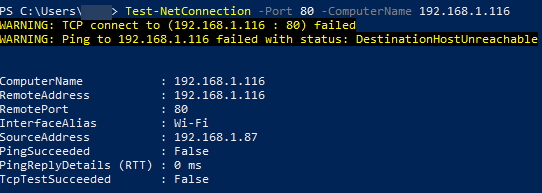
Test-NetConnection -Port 80 -ComputerName 192.168.1.116
- The below examples show what a failed and successful test looks like.

- Directly connect to the camera with a PoE injector and laptop and repeat this test.
- If it is successful take the results to local IT and have them verify there are no issues with any Windows Firewall settings, network firewalls, or access control lists (ACL's).
Was this article helpful?
Bu bilgiler sorununuzu çözmeye yardımcı oldu mu?
Thanks for your feedback!
Still need help?
Uzman ekibimiz size yardımcı olmak için burada.