Dahua - DMSS - Push Notifications Setup
20 Aug 2026
364 views
Enable notifications for alarm events
1. Launch DMSS Mobile App.
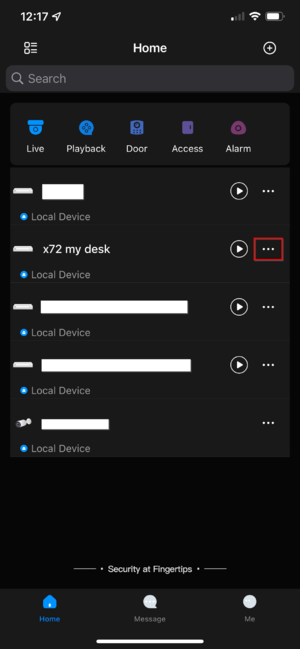
2. Tap on  Home to access your added device list.
3. Tap on the 3 dots to expand the menu list.
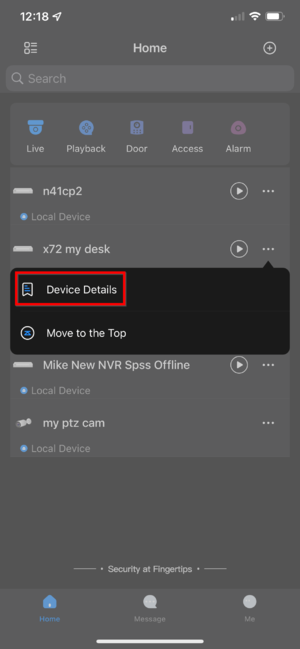
4. Tap on "Device Details"
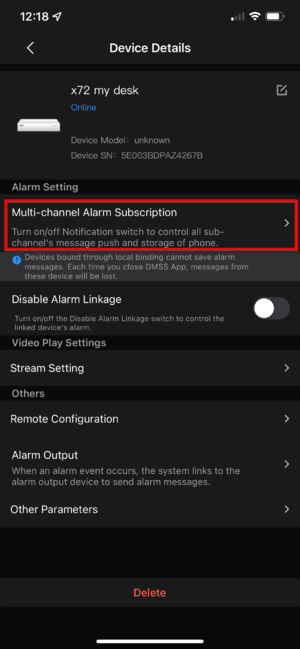
5. Tap on "Multi-channel Alarm Subscription" to allow receiving notification.
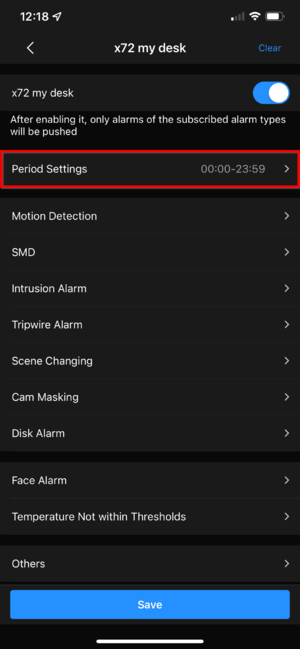
6. Tap the radio button so the button is highlighted in blue + the white circle should be on the right-hand side now. Select the type of events corresponding to your needs below such as "Motion", "SMD", etc.
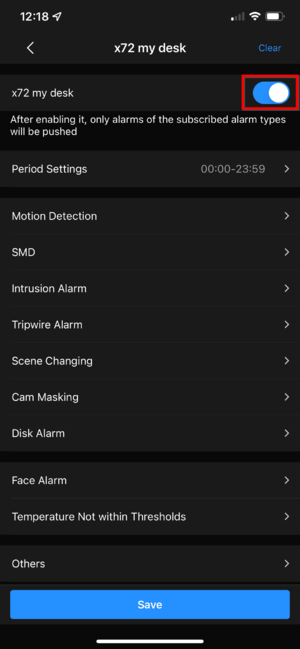
7. If you don't want to receive notification 24/7, you can adjust the schedule here to reflect the preferred schedule.
Was this article helpful?
Bu bilgiler sorununuzu çözmeye yardımcı oldu mu?
Thanks for your feedback!
Still need help?
Uzman ekibimiz size yardımcı olmak için burada.