Change Color247 LED setting
20 Aug 2026
351 views
Usually, you really don't need to change this setting because the camera is designed for the low lux environment. If you are in the total dark environment, you may turn on the White LED to enhance the image quality.
To turn on the TVI Color 247 LED setting. You need to open the OSD menu from the PTZ panel.
Use the Iris + to bring up the OSD Menu. use Up/Dn/Lf/Rt to control the cursor from the OSD menu.
Use Iris + to select it.

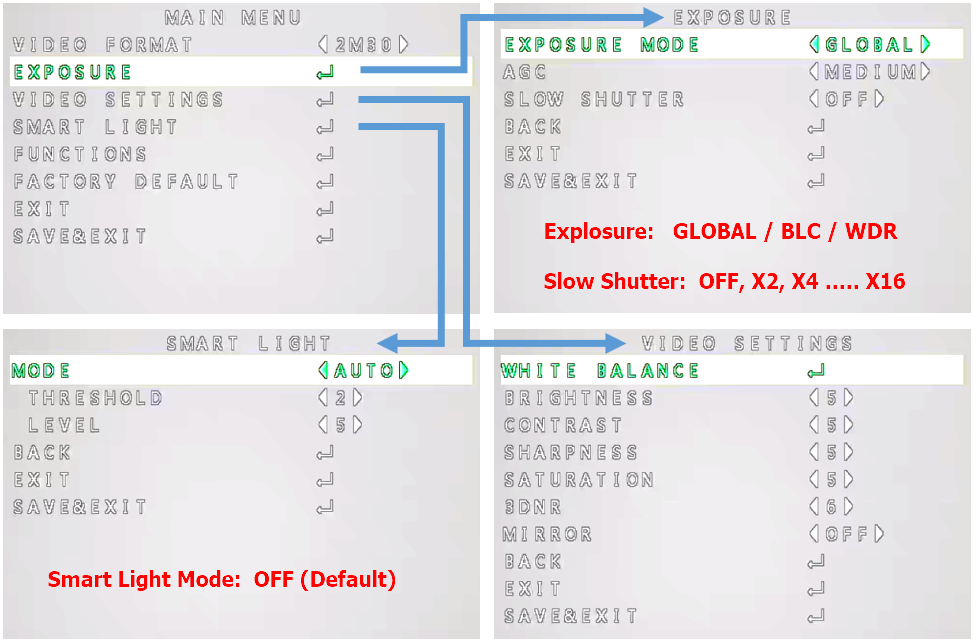
The Option is only Auto / OFF
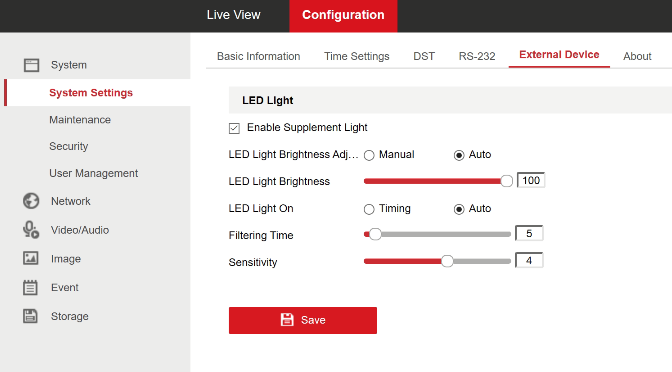
IP Camera LED Settings
Was this article helpful?
Bu bilgiler sorununuzu çözmeye yardımcı oldu mu?
Thanks for your feedback!
Still need help?
Uzman ekibimiz size yardımcı olmak için burada.