Basic TVI Setup
Basic TVI Setup
Analog and TVI surveillance systems unlike IP surveillance systems are more physically restricted in that the cameras require a hard line connection to the recorders themselves. Furthermore, you will need supply power apart from the data connection to the cameras. In this article, we will go over what is required for a proper TVI surveillance setup and what we recommend.
Requirements
Power Supply: (Example) DV-AT1232A-D24
Coaxial or Siamese cable: (Example) LTAC2100W
TVI DVR: (Example) LTD8416K-ST
TVI Camera: (Example) CMHT2422B
Router: Any router that has internet access
Monitor: (Example) M-215JPGM8 / Only required if you do not have a PC on site
Example TVI Setup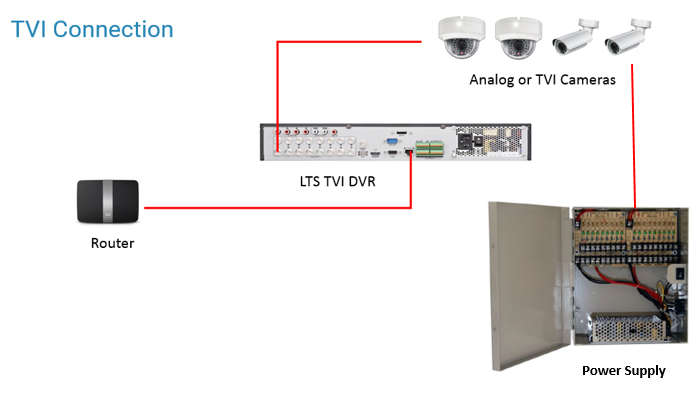
Connecting the Camera
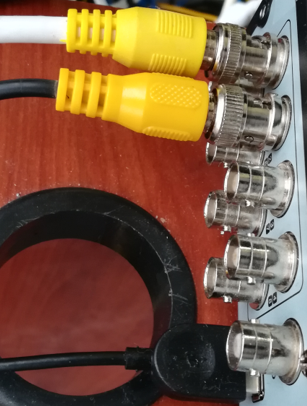
Step 1. You will connect the BNC connector end of the coaxial cable to the back of the DVR. Take care to twist all the way when connecting the cable to prevent video issues.
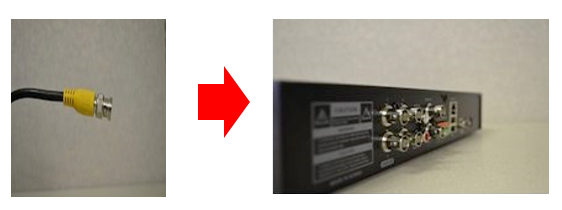
It should look like the connections below when correctly connected.
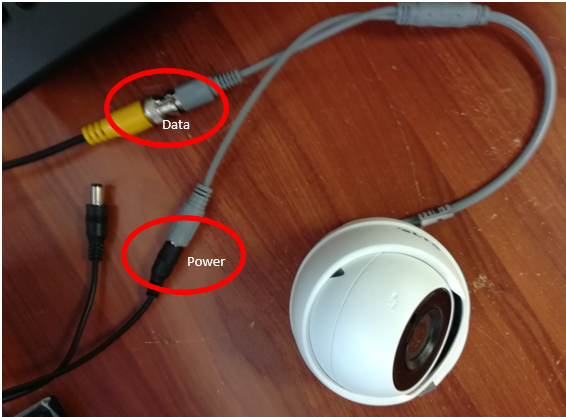
Step 2. Connect the power supply directly to the camera as shown below.
Distances and Power Drop Off
Coaxial cables may be run up to 1000 feet for video data but power, depending of the gauge of the cable, has different effective distances. If you run the power connections far beyond it's effective distance, you may experience loss of power for your devices.
Was this article helpful?
Bu bilgiler sorununuzu çözmeye yardımcı oldu mu?
Still need help?
Uzman ekibimiz size yardımcı olmak için burada.