Akuvox - Call forwarding
Model AK-X933/C319
Model AK-C313/C315
Model AK-X933/C319
Call Forwarding Setting
Call Forward is a feature used to redirect an incoming call to the specific third party. Users can redirect the incoming call based on different scenarios. Typically, call forward has three modes: Always Forward/ No Answer Forward/Busy Forward.
Call Forwarding Configuration on the Device
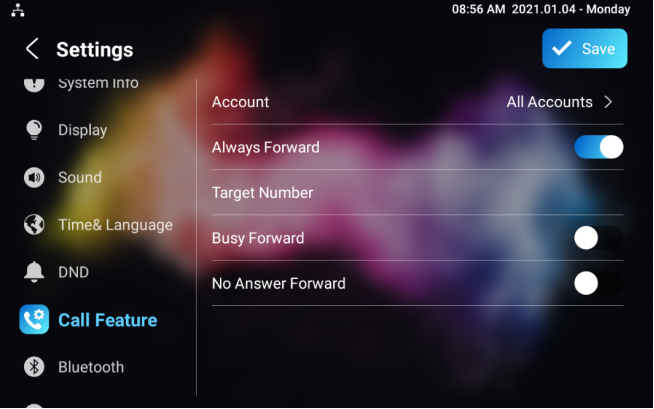
To do the configuration on the Device Settings >Call Feature interface.
Parameter Set-up:
- Account: to choose which account shall implement call forwarding feature.
- Always Forward: to enable always forwarding function; all incoming calls will be automatically forward to a specific number.
- Busy Forward: to enable busy forwarding function; incoming calls will be forwarded to a specific number if phone is busy.
- No Answer Forward: to enable no answer forwarding function; incoming calls will be forwarded to a specific number if phone is not picked within no answer ring time.
- Target Number: to enter the specific forward number if X933/C319 enables always forward / busy forward / no answer forward.
Call Forwarding Configuration on the Web Interface
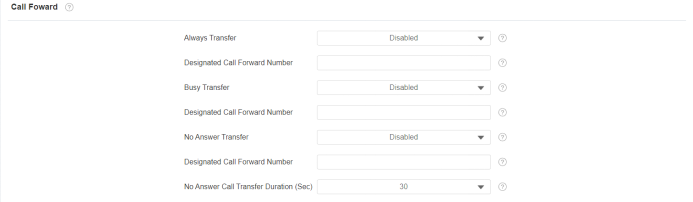
To set up forward function on web Phone > Call Feature > Call Forward interface.
Parameter Set-up:
- Always Transfer: To enable always forwarding function; all incoming calls will be automatically forward to a specific number.
- Busy Transfer: To enable busy forwarding function; incoming calls will be forwarded to a specific number if the phone is busy.
- No Answer Transfer: To enable no answer forwarding function; incoming calls will be forwarded to a specific number if the phone is not picked within no answer ring time.
- Designated Call Forward Number: To enter the specific forwarding number if X933/C319 enables always forwarding / call forwarding busy / no answer forwarding.
- No Answer Call Transfer Duration Sec: to set the no answer time interval from 0 to 120 seconds before the call is transferred to a designated number.
Model AK-C313/C315
Call Forwarding Setting
Call Forward is a feature used to redirect an incoming call to a specific third party. Users can redirect the incoming call if it is no answer.
Call Forwarding Configuration on the Device
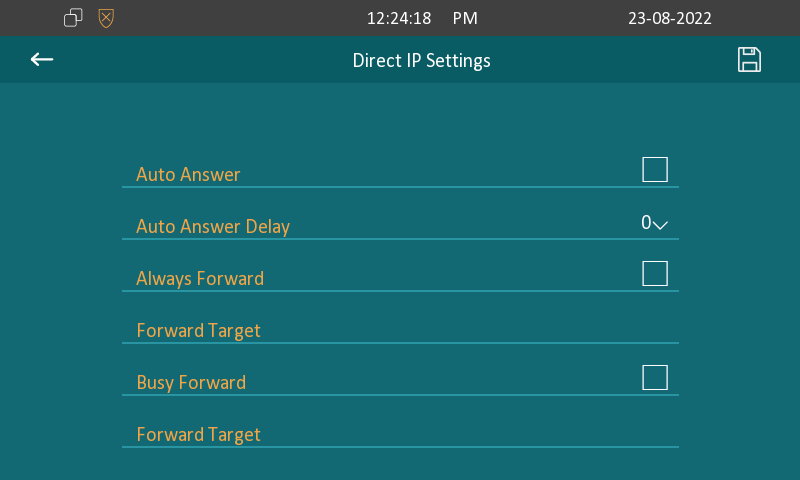
To do the configuration on the device screen, More > Setting > Advance > Direct IP.
Parameter Set-up:
- No Answer Forward: To enable no answer forwarding function; incoming calls will be forwarded to a specific number if the phone is not answered.
- Forward Target: To enter the specific forward number if C313 enables No Answer Forwarding.
- No Answer Ring Time: Set the number of seconds to wait for call pick-up before transferring to a designated number (0-120 seconds).
Call Forwarding Configuration on the Web Interface
You can also set the no answer ring time on the web interface. Go to Phone > Call Feature Forward Transfer.

Call Forwarding Configuration on the Web Interface
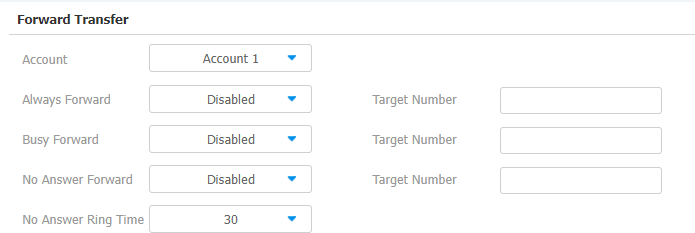
To set up forward function on web Phone > Call Feature > Forward Transfer interface.
Parameter Set-up:
- Account: To choose which account shall implement the call forwarding feature.
- Always Forward: To enable the always forwarding function; all incoming calls will be automatically forwarded to a specific number.
- Busy Forward: To enable the busy forwarding function; incoming calls will be forwarded to a specific number if the phone is busy.
- No Answer Forward: To enable the no answer forwarding function; incoming calls will be forwarded to a specific number if the phone is not picked up within no answer ring time.
- Target Number: To enter the specific forward number if the device enables always forward/busy forward / no answer forward.
Was this article helpful?
Bu bilgiler sorununuzu çözmeye yardımcı oldu mu?
Still need help?
Uzman ekibimiz size yardımcı olmak için burada.