Why can't I log into WebViewer?
20 Aug 2026
495 views
To log into Alfred on WebViewer, simply log in with the same email account.
However, if you run into issues while logging into Alfred on WebViewer, this article will provide you with:
Initial troubleshooting steps
- Open the WebViewer in incognito mode
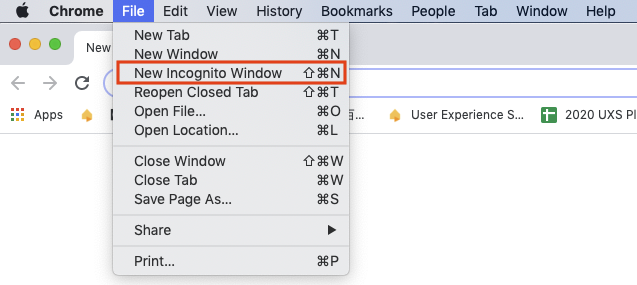
If Incognito mode doesn't solve the issue and you're using a Google email account:
- Go to Google
- Log out of all of your accounts
- Log in again
If the above steps do not solve the issue,
- Try a different browser (Chrome or Safari)
- Make sure the browser has no plug-in or extension installed
More advanced troubleshooting steps
Unblocking third-party cookies might solve the issue. You'll find out how to unblock cookies on Chrome:
Chrome
- Click on the menu on the upper right corner and choose Settings

- Drag down to find Advanced

- Find Content settings

- Find “Cookies”

- Allow cookies and unblock third-party cookies
- Refresh the webpage
- Relaunch your browser
🙋 Still have questions? Please contact us from the More tab in the app.
Was this article helpful?
Bu bilgiler sorununuzu çözmeye yardımcı oldu mu?
Thanks for your feedback!
Still need help?
Uzman ekibimiz size yardımcı olmak için burada.