What do I do if Viewer Priority isn't working?
20 Aug 2026
384 views
There are two scenarios where Viewer Priority may not work:
1. When a Live session was not ended properly (error code 1016)
If a Live session from your Camera device has not been ended, or if it is an iOS device, an incoming Viewer will receive a 1016 error code.
- Make sure there isn't another device watching Live, and
- Try again in 20 seconds
2. When you can't change the settings (error code 5023 & 5024)
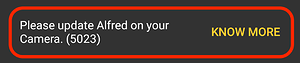
- For error code 5023: Update the Alfred app on your Camera device
- For error code 5024: Switch your Camera device to an Android device. Viewer Priority is not currently available on iOS devices.
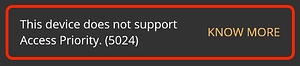
⚠️Note: Viewer Priority is not supported on iOS Camera devices. For iOS Viewer devices, the only option is Always reject.
🙋 Still have questions? Please contact us from the More tab in the app.
Was this article helpful?
Bu bilgiler sorununuzu çözmeye yardımcı oldu mu?
Thanks for your feedback!
Still need help?
Uzman ekibimiz size yardımcı olmak için burada.