Type 4-What to do if hard disk drive can't be recognized?
Applies to: N48PT
We sell the system with a hard drive. But we also sell the system without one.
Please make sure yours does include a pre-installed hard drive inside first.
Go to setting to check if there is the hard drive and its status is normal.

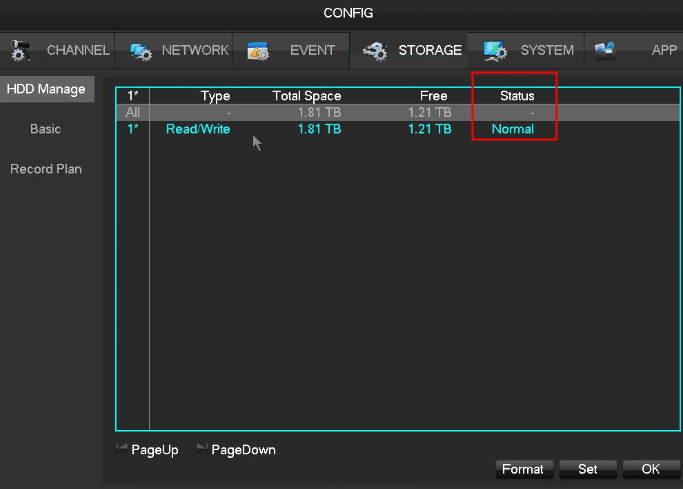
If there is nothing on the storage or the status is not normal, it means something is wrong.
Please try troubleshooting methods below.
1. If the status says unformatted, click format.
2. If the hard drive is not from us, please make sure your hard drive is for surveillance use, not for PC use,
3. Open the cover of DVR/NVR. Uninstall and install HDD for several times. Here is the detailed instruction for your reference.
https://support.sannce.com/hc/en-us/articles/900000433303
4. Install hard drive and put hard drive close to your ear to check if you can hear some noise. One hour later, use hand to touch the hard drive to check if it is warm. If you can not hear any sound and surface of the hard drive is not warm, it can prove hard drive is not even powered up. Please share our result.
5. Unplug DVR or NVR from power and plug again.
6. Restore DVR or NVR to factory setting.
7. Change an adapter for DVR.
8. Try a spare DVR or HDD if you have.
Was this article helpful?
Bu bilgiler sorununuzu çözmeye yardımcı oldu mu?
Still need help?
Uzman ekibimiz size yardımcı olmak için burada.