(IE) - Auto Display LiveView after Login
20 Aug 2026
209 views
If the internet speed is fast and you want to see all the camera without press any buttons.
Here is the instruction.
Open IE, Login first.
Go to Configuration > Local (Note: only IE browser support the Local options)
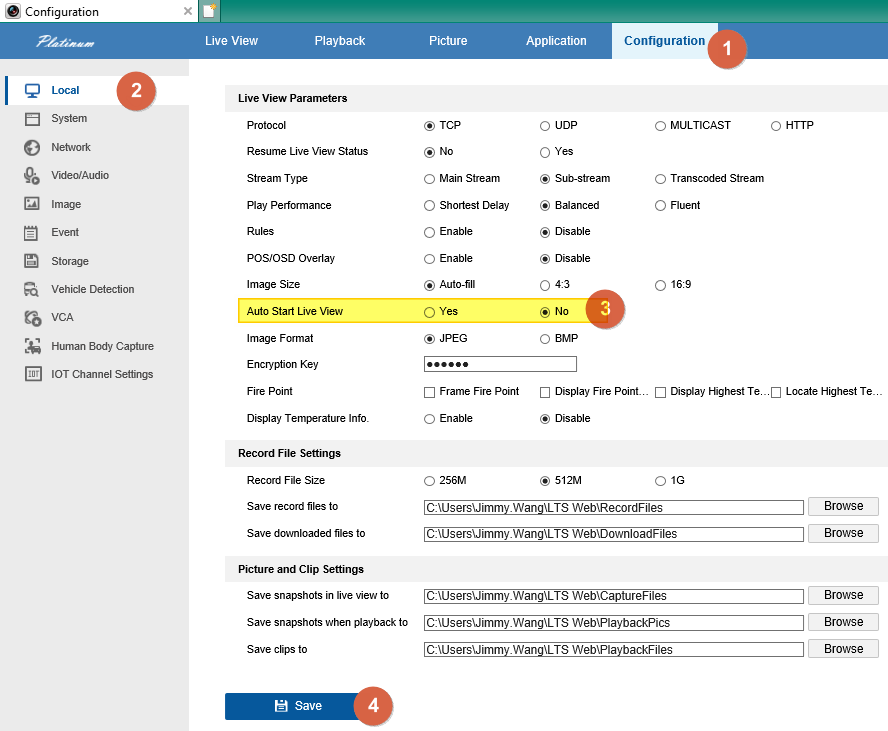
Change Auto Start Live View to Yes.
Go back to the Live View. Then, you should able to see all camera without press any button.
(Final: Strongly Don't recommend for the Slow internet connections.
That might cause the Internet Explorer crash easily)
Was this article helpful?
Bu bilgiler sorununuzu çözmeye yardımcı oldu mu?
Thanks for your feedback!
Still need help?
Uzman ekibimiz size yardımcı olmak için burada.