How to get a recorder to display in full screen mode.
20 Aug 2026
366 views
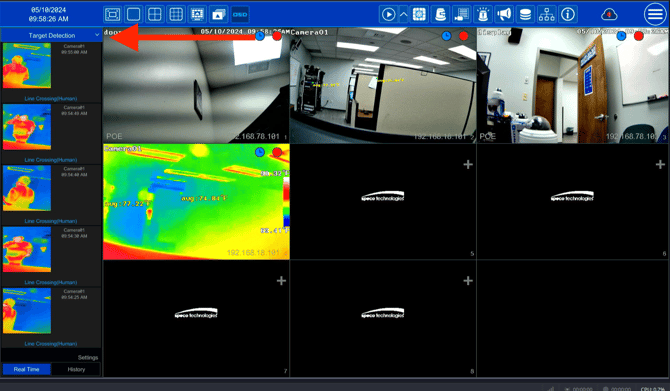
Step1:
- Click the arrow point down under target detection.
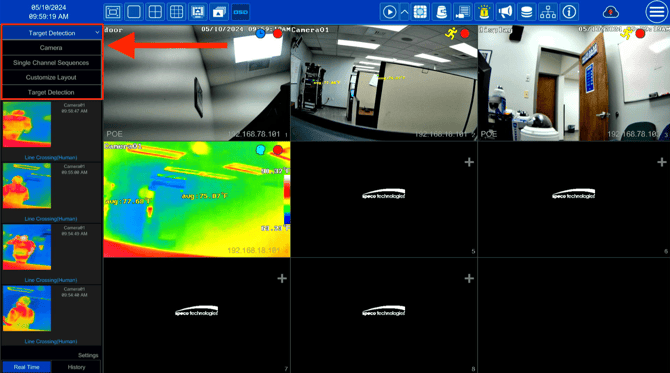
Step 2:
- Click on the camera tab.
Step 3:
- Go into full screen mode.
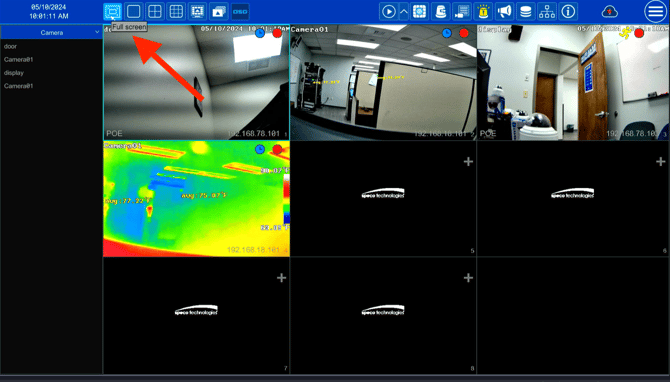
- This is the end result (Full Screen Mode)

Initial Publish Date: May 10th, 2024

Published by: Tim O'Brien, Lead Technician
Step1:
- Click the arrow point down under target detection.
Step 2:
- Click on the camera tab.
Step 3:
- Go into full screen mode.
- This is the end result (Full Screen Mode)
Initial Publish Date: May 10th, 2024

Published by: Tim O'Brien, Lead Technician
Was this article helpful?
Bu bilgiler sorununuzu çözmeye yardımcı oldu mu?
Thanks for your feedback!
Still need help?
Uzman ekibimiz size yardımcı olmak için burada.