How to Enable Spot Monitoring for a Speco Blue Hybrid Recorder
20 Aug 2026
378 views
- Go to Settings > System

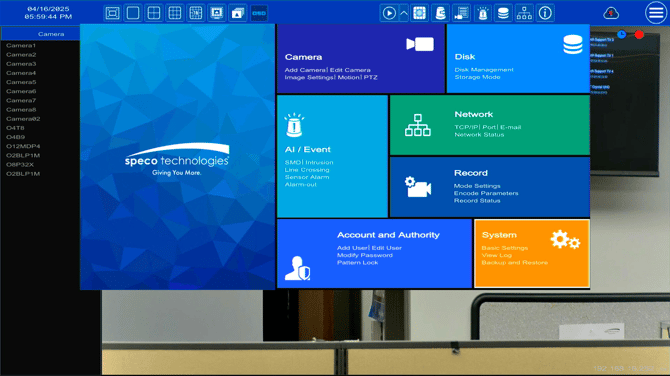
- Towards the middle of the page, click the check box for Spot
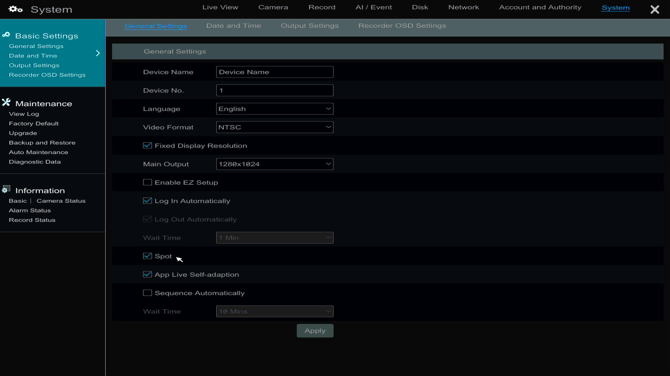
- With the Spot option enabled a sequence can be configured
- Go to Output Settings > Output2
- Go to Output Settings > Output2
- When the Spot option is disabled, the CVBS output on the recorder will mirror the HDMI and VGA outputs, with standard low resolution
Initial submission Date: April 16, 2025

Article authored by: Michael Pagano, Tier 1
- Go to Settings > System
- Towards the middle of the page, click the check box for Spot
- With the Spot option enabled a sequence can be configured
- Go to Output Settings > Output2
- Go to Output Settings > Output2
- When the Spot option is disabled, the CVBS output on the recorder will mirror the HDMI and VGA outputs, with standard low resolution
Initial submission Date: April 16, 2025

Article authored by: Michael Pagano, Tier 1
Was this article helpful?
Bu bilgiler sorununuzu çözmeye yardımcı oldu mu?
Thanks for your feedback!
Still need help?
Uzman ekibimiz size yardımcı olmak için burada.