Digital Watchdog (DW): Adding an Omni LX
20 Aug 2026
314 views
Issue:
The customer needs to add an Omni LX to DW.
Note: Adding as RTSP will use 1 license per channel.
Resolution:
- From the camera webpage, configure motion and confirm the motion blocks (green) are triggering.
- Add the Omni to DW using the below syntax with the camera username and password.
rtsp://10.0.0.201:554/stream1_1
rtsp://10.0.0.201:554/stream1_2
rtsp://10.0.0.201:554/stream1_3
rtsp://10.0.0.201:554/stream1_4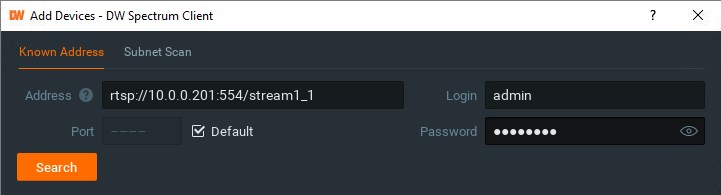
- The secondary stream may not automatically populate. You may need to edit the camera settings to include it.
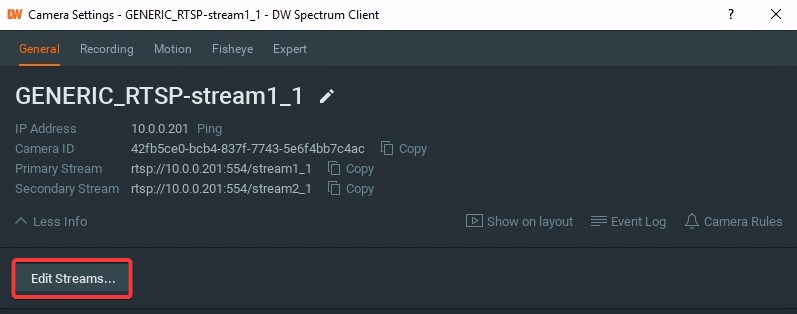
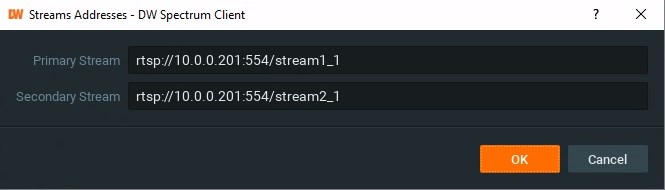
- You should see a motion tab when you apply the settings.
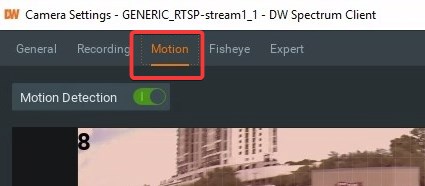
Was this article helpful?
Bu bilgiler sorununuzu çözmeye yardımcı oldu mu?
Thanks for your feedback!
Still need help?
Uzman ekibimiz size yardımcı olmak için burada.