Annke Vision - Testing Network Delay and Packet Loss on Annke DVR/NVR
20 Aug 2026
375 views
Applies to:
DT41Y/DT61Y/DT81Y/DN41R/DN61R/DN81R/DT41GB/DT81GB/DT61GB/DT41DB/DT81DB/DT61EQ/DW41JD/DW81KD/DW61LD/DT81DP/N48PI/N44PI/N46PI/N44PAM/N48PAW/N46PCK/N88PCH/N441Y/N481Y/S500/S300/FC200/NCK800/H800/H500
Purpose:
You can obtain network connecting status of DVR through the network detection function, including network delay, packet loss, etc
Before you start:
- You should log in to your device.
- Ensure that the network status remains stable.
- Click Menu > Maintenance > Net Detect.
Steps:
- Click the Network Detection tab to enter the Network Detection interface.
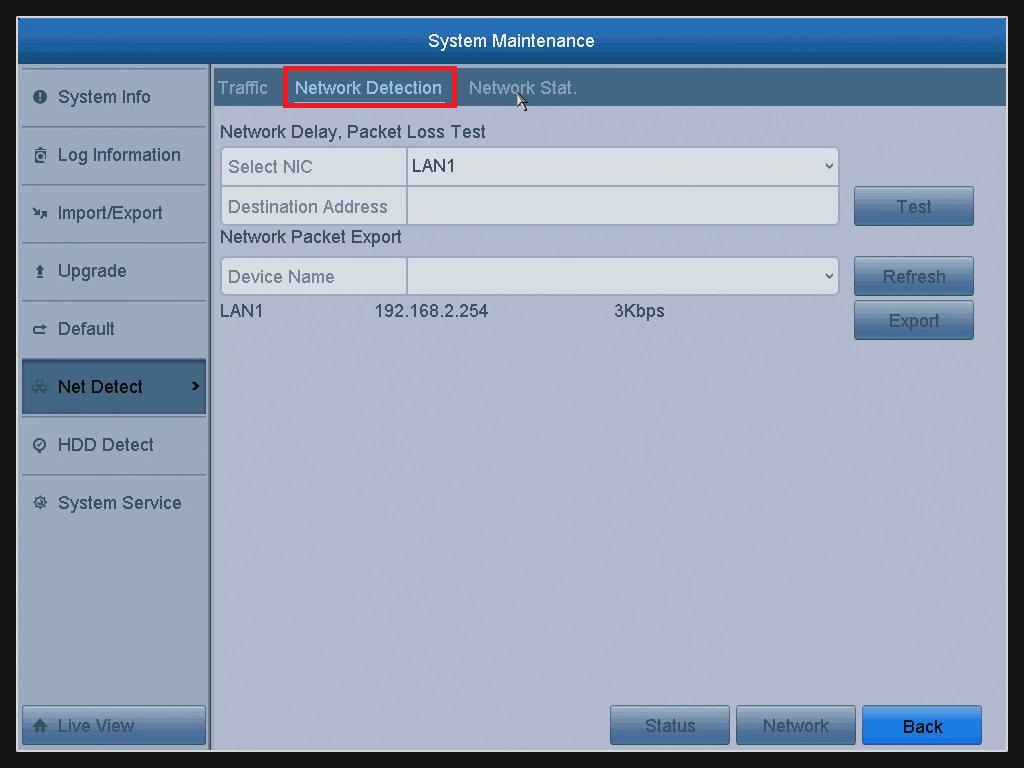
- Select a NIC to test network delay and packet loss.
- Enter the Destination Address in the text field of Destination Address.
- Click the Test button to start testing network delay and packet loss.
Was this article helpful?
Bu bilgiler sorununuzu çözmeye yardımcı oldu mu?
Thanks for your feedback!
Still need help?
Uzman ekibimiz size yardımcı olmak için burada.