Annke Vision - Set up NTP on Annke DVR/NVR
20 Aug 2026
383 views
Applies to:
DT41Y/DT61Y/DT81Y/DN41R/DN61R/DN81R/DT41GB/DT81GB/DT61GB/DT41DB/DT81DB/DT61EQ/DW41JD/DW81KD/DW61LD/DT81DP/N48PI/N44PI/N46PI/N44PAM/N48PAW/N46PCK/N88PCH/N441Y/N481Y/NCK800/H800/H500
Purpose:
A Network Time Protocol (NTP) Server can be configured on your DVR/NVR to ensure the accuracy of system date/time.
Before you start:
- You should log in to your device.
- Click Menu > Configuration > Network.
Steps:
-
Tap the NTP tab to enter the NTP Settings interface.
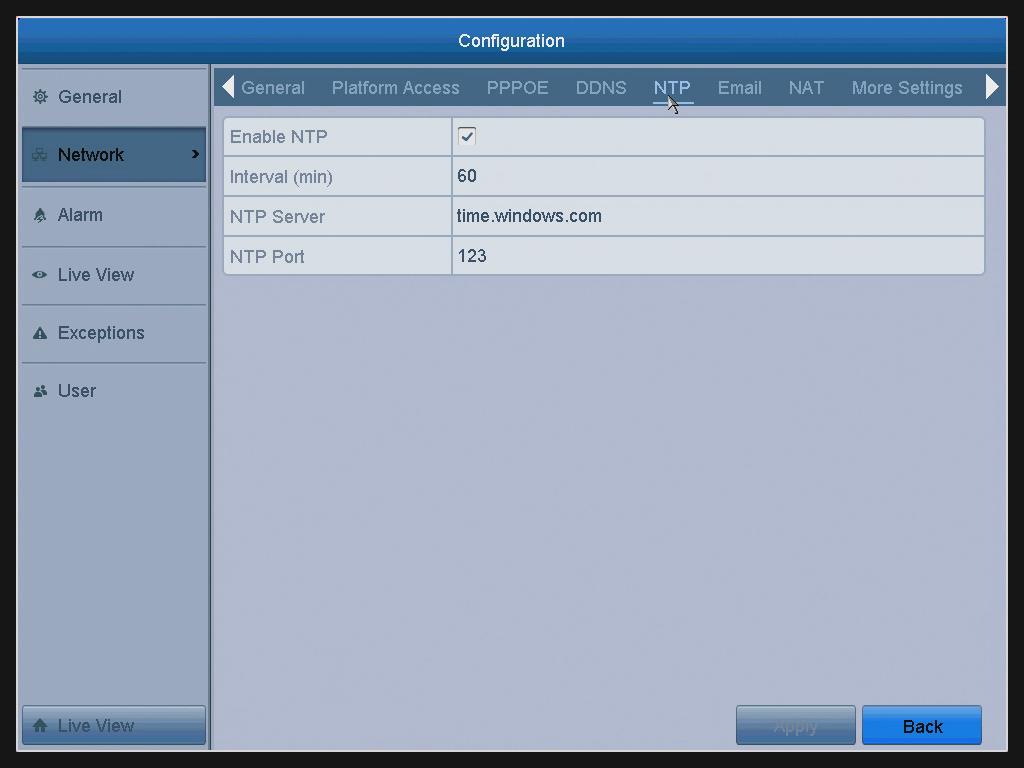
- Check the Enable NTP checkbox to enable this feature.
-
Configure the following NTP settings:
Interval(min): Time interval between the two synchronizing actions with the NTP server. The unit is minute.
NTP Server: IP address of the NTP server.
NTP Port: Port of NTP server.
- Click the Apply button to save and exit the interface.
Notes:
- The time synchronization interval can be set from 1 to 10080 minutes, and the default value is 60 minutes.
- If the DVR is connected to a public network, you should use an NTP server that has a time synchronization function.
- If the DVR is set in a more customized network, NTP software can be used to establish an NTP server used for time synchronization.
Was this article helpful?
Bu bilgiler sorununuzu çözmeye yardımcı oldu mu?
Thanks for your feedback!
Still need help?
Uzman ekibimiz size yardımcı olmak için burada.