Annke Vision - Searching/Exporting Log Files on Annke DVR
20 Aug 2026
326 views
Applies to: DT41Y/DT61Y/DT81Y/DN41R/DN61R/DN81R/DT41GB/DT81GB/DT61GB/DT41DB/DT81DB/DT61EQ/DW41JD/DW81KD/DW61LD/DT81DP/S500/S300/FC200
Purpose: The operation, exception, and information of the DVR can be stored in log files, which can be searched, viewed and exported at any time.
Before you start:
- You should log in to your device.
- Please connect the backup device to DVR before operating log export.
Steps:
-
Click Menu > Maintenance > Log Information.

- Set the log search conditions, including the Start Time, End Time, Major Type and Minor Type.
- Click the Search button to start search log files.
-
The matched log files will be displayed on the list.
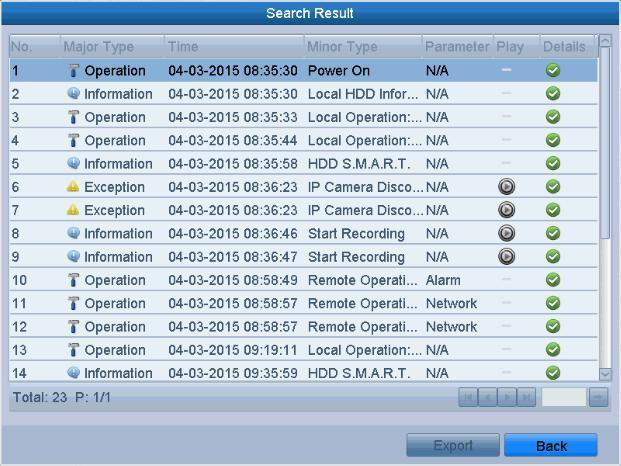
- You can click the
 button of each log or double-click it to view its detailed information.
you can also click the button to view the related video files if available
 -
If you want to export the log files, click the Export button to enter the Export menu.
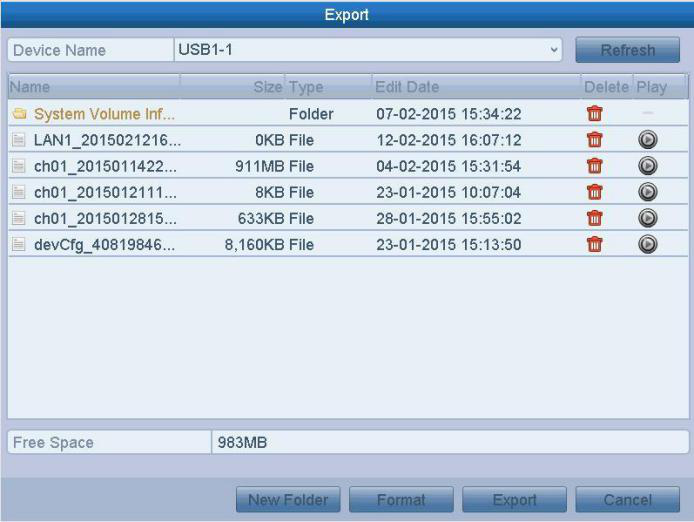
- Select the backup device from the dropdown list of Device Name, Click the Export to export the log files to the selected backup device.
- You can click the New Folder button to create a new folder in the backup device, or click the Format button to format the backup device before log export.
Note: The log files exported to the backup device are named by exporting time,
e.g.,20110514124841logBack.txt.
e.g.,20110514124841logBack.txt.
Was this article helpful?
Bu bilgiler sorununuzu çözmeye yardımcı oldu mu?
Thanks for your feedback!
Still need help?
Uzman ekibimiz size yardımcı olmak için burada.