Annke Vision - Playing Back by Event Search on Annke NVR/DVR
20 Aug 2026
307 views
Applies to: N48PI/N44PI/N46PI/N44PAM/N48PAW/N46PCK/N88PCH/DT41Y/DT61Y/DT81Y/DN41R/DN61R/DN81R/DT41GB/DT81GB/DT61GB/DW41JD/DW81KD/DW61LD/DT81DP
Purpose: Playback record files on one or several channels searched out by restricting event type (e.g. alarm input and motion detection).
Before you start:
- You should log in to your device.
- Click Menu > Playback > Event.
Steps:
- Go to the Event playback interface.
- Select Motion, Alarm Input or VCA as the Major Type, and edit the Start time and End time.
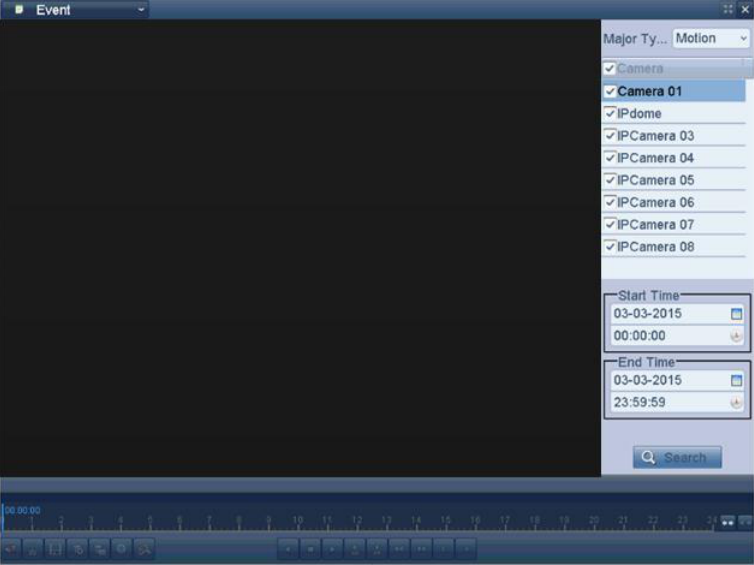
- Click the Search button to get the search result information. You may refer to the right-sidebar for the result.
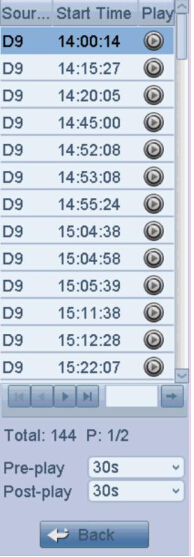
- Click
 button to playback the file.
Note: You can click the Back button to back to the search interface.
Was this article helpful?
Bu bilgiler sorununuzu çözmeye yardımcı oldu mu?
Thanks for your feedback!
Still need help?
Uzman ekibimiz size yardımcı olmak için burada.