Annke Vision - Manual Video Quality Diagnostics on Annke DVR
20 Aug 2026
364 views
Applies to: DT41Y/DT61Y/DT81Y/DN41R/DN61R/DN81R/DT41GB/DT81GB/DT61GB/DT41DB/DT81DB/DT61EQ/DW41JD/DW81KD/DW61LD/DT81DP
Purpose: You can manually diagnose the video quality of the analog channels.
Before you start: Connect the camera to the device for the video quality diagnostics.
Steps:
-
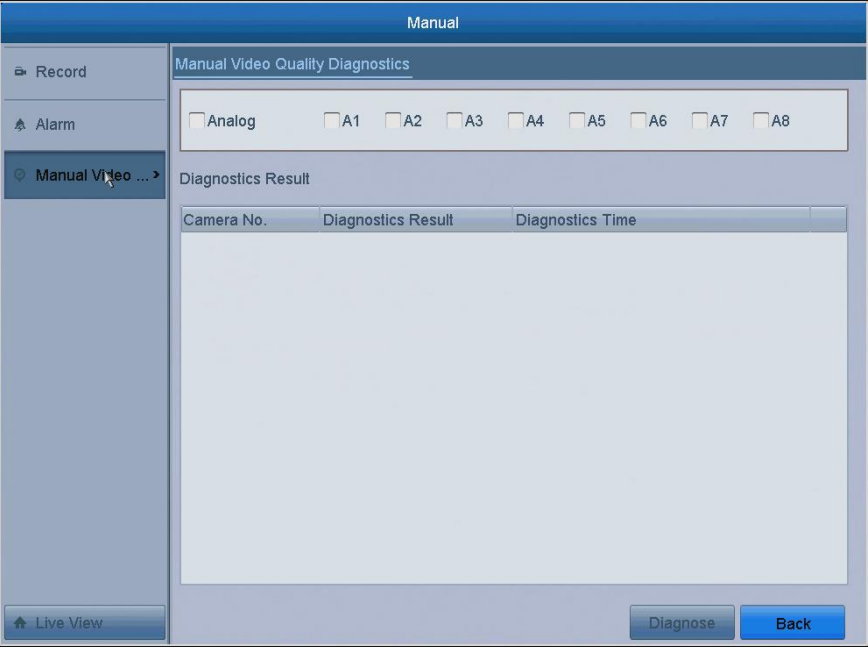
Click Menu> Manual>Manual Video Quality Diagnostics, and enter the Manual Video Quality Diagnostics interface.
-
Check the boxes to select the channels for diagnostics.
-
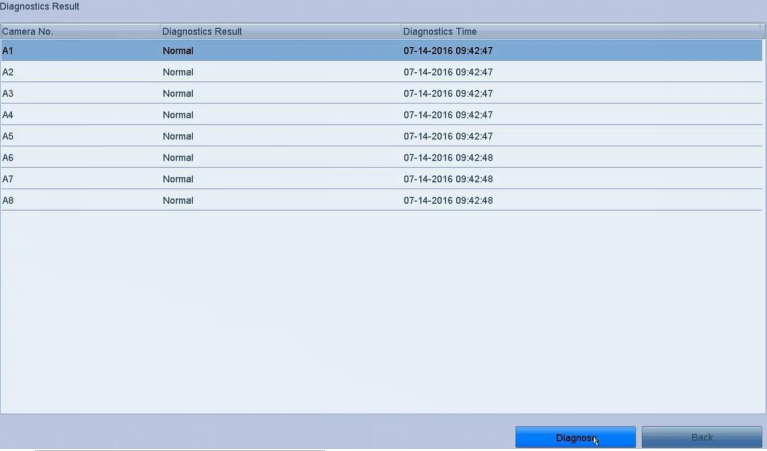
Click the Diagnose button.
Notes:
- The diagnosed results will be displayed on a list.
- You can view the video status and diagnostics time of the selected channels.
- Three exception types can be diagnosed: Blurred Image, Abnormal Brightness and Color Cast.
Was this article helpful?
Bu bilgiler sorununuzu çözmeye yardımcı oldu mu?
Thanks for your feedback!
Still need help?
Uzman ekibimiz size yardımcı olmak için burada.