Annke Vision - How to Use Two-Way Audio on Annke Vision App
Applies to:
DT41Y/DT61Y/DT81Y/DN41R/DN61R/DN81R/DT41GB/DT81GB/DT41DB/DT61EQ/DW81KD/DW61LD/DT81DP/N48PI/N46PI/N44PI/N44PAM/N48PAW/N46PCK/N88PCH/N441Y/N481Y/I21AE/I21AF/I41DQ/I61DQ/I61DR/I61DS/I41HG/I41CS/C800/C500/B1200/NC400/CZ500/CZ400/S500/S300/FC200/NCK800/H800/H500
Purpose:
When the ANNKE device has the audio ability (equipped with a microphone and a speaker), you can hear audio from the device on the Annke Vision app by following the below steps.
Steps:
1. Connect the microphone and the speaker to the ANNKE device, and configure audio settings on the ANNKE device. Refer to this article:
Annke Vision - How to Make Recordings with Sound on DVR/NVR?
2. On the Annke Vision, touch on the 'Audio' icon when watching a live stream or playback from the camera.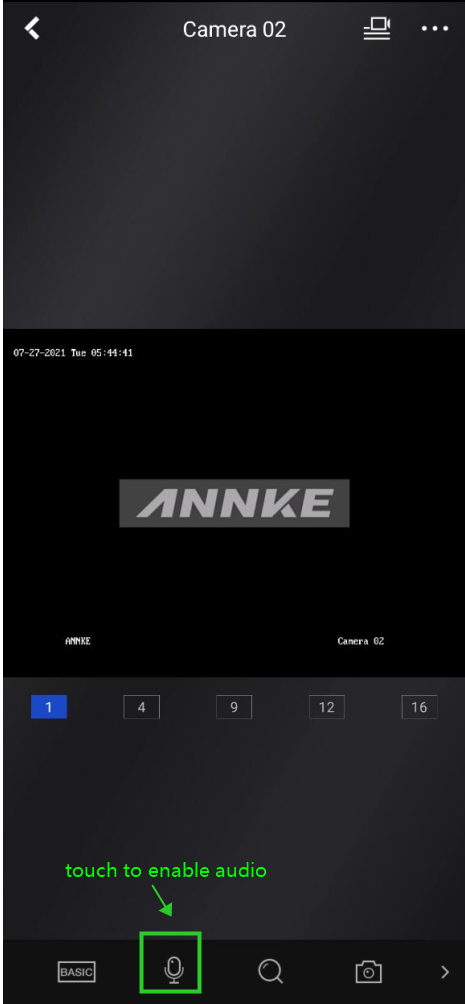
Note:
1. For the ANNKE device with one Audio In port, only the camera on Channel #1 is capable of audio.
2. The microphone and the speaker needs to be placed near the camera location for the two-way audio purpose.
If you find this article helpful, please click 'Yes' at the end of this article;
If you have any suggestions or questions for this article, please leave a comment in the below comment zone.
Was this article helpful?
Bu bilgiler sorununuzu çözmeye yardımcı oldu mu?
Still need help?
Uzman ekibimiz size yardımcı olmak için burada.