Annke Vision-How to Set up Overwrite Function? (H800)
Applies to: N48PAW/N46PCK/H800
Introduction:
When the hard drive is full, it will stop saving new recordings. If the overwrite function is set up, the old recordings will be deleted automatically and gradually. In this way, the system can keep recording all the time. You may refer to the article to find detailed instructions.
Steps:
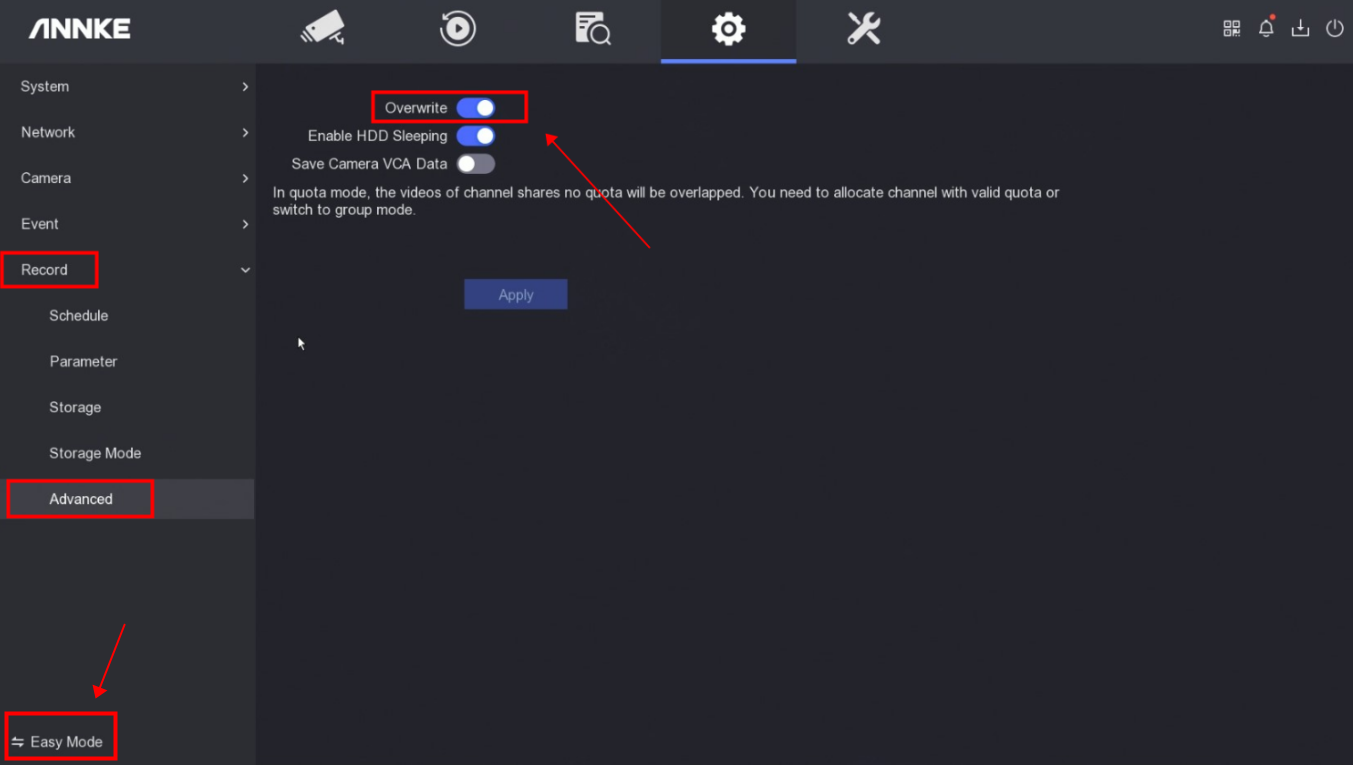
1. Access the system menu on the monitor and switch the system to 'Expert Mode' first on the left bottom corner.
2. Go to 'Record→Advanced'.
3. Click 'Apply' to save the settings.
Notice:
If you have any other questions, please contact ANNKE technical support at support@annke.com by email.
If this article is helpful to you, please click the "helpful" button after you review it. Any comments would be appreciated.
Was this article helpful?
Bu bilgiler sorununuzu çözmeye yardımcı oldu mu?
Still need help?
Uzman ekibimiz size yardımcı olmak için burada.