Annke Vision-How to Export The System Logs? (H800)
20 Aug 2026
417 views
Applies to: N48PAW/N46PCK/H800
Introduction:
The system logs recorded the activities that have happened. In this article, we will show you how to export the system logs.
Steps:
1. Plug a USB stick into the USB port of the NVR.
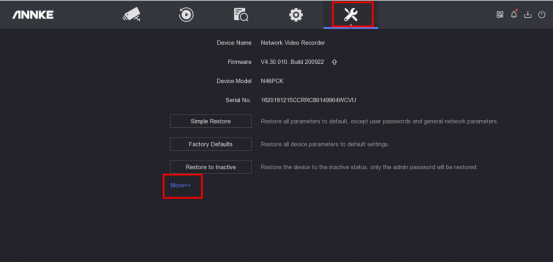
2. Access the system menu on the monitor and go to ‘Maintenance→More→Log Information’.
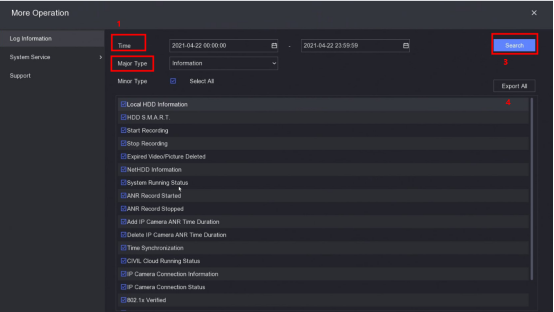
3. Select the time and major type. Then click 'search'. After the logs are found, click 'Export All’.
If you have any other questions, please contact ANNKE technical support at support@annke.com by email.
If this article is helpful to you, please click the "helpful" button after you review it. Any comments would be appreciated.
Was this article helpful?
Bu bilgiler sorununuzu çözmeye yardımcı oldu mu?
Thanks for your feedback!
Still need help?
Uzman ekibimiz size yardımcı olmak için burada.