Annke Vision-Fast Forward The Recordings on The APP
Applies to:
DT41Y/DT61Y/DT81Y/DN41R/DN61R/DN81R/DT41GB/DT81GB/DT61GB/DW41JD/DW81KD/DW61LD/DT81DP/N48PI/N44PI/N46PI/N44PAM/N48PAW/N46PCK/N88PCH/S500/S300/FC200/NCK800/H800/H500/CZ400/CZ500/C500
Introduction:
The Annke Vision supports fast forward feature only when the device is connected to the APP by its IP address. This article will show you how to fast forward the video on the APP.
Steps:
1. Please connect the device and phone to the same LAN network. In other words, please make sure the device and the phone are connected to the same router or switch. The phone can connect to the router by WIFI.
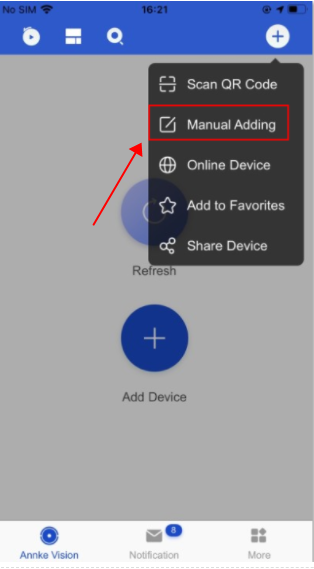
2. Please sign in the Annke Vision APP and click 'Manual Adding'.
3. The Adding Type should be IP/Domain.
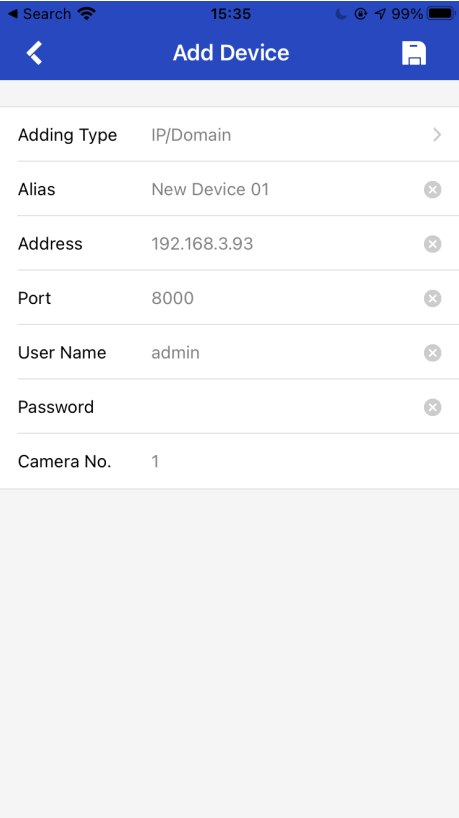
Key Information.
The Address refers to the device's IP address.
The user name is admin.
The Password refers to the device`s password instead of the APP login password.
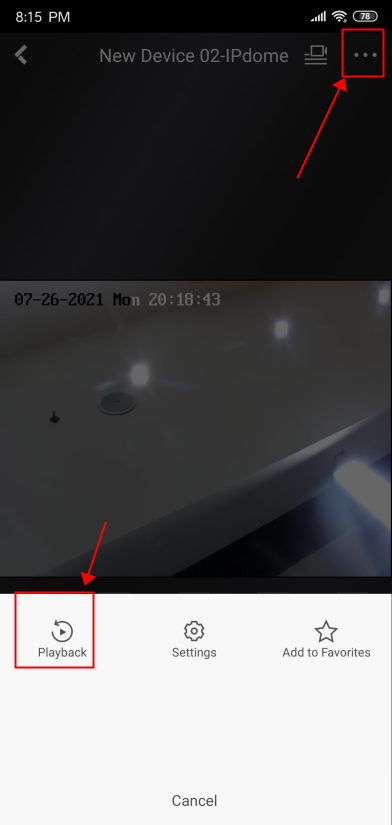
4. Please go to "Playback" on the Annke Vision APP.
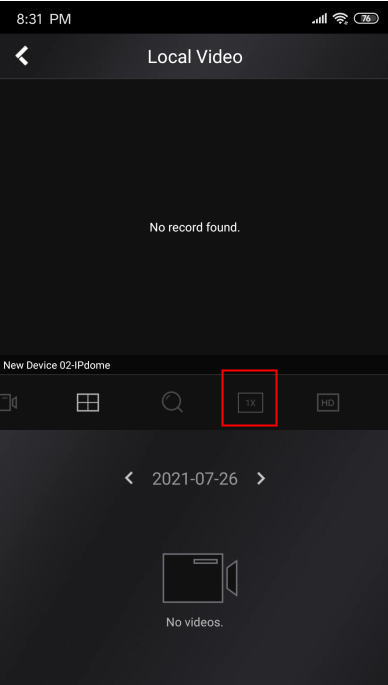
5. Please click the fast forward button to speed up the videos.
Notice:
If you have already connected the device to the APP by scanning the device QR code on the monitor/TV, please delete the device and reconnect it to the APP by the IP address. The detailed instructions are shown in the link below.
Annke Vision - Deleting Device on Annke Vision
For any other questions, please contact ANNKE technical support at support@annke.com by email.
If this article is helpful to you, please click the "helpful" button after you review it. Any comments would be appreciated.
Was this article helpful?
Bu bilgiler sorununuzu çözmeye yardımcı oldu mu?
Still need help?
Uzman ekibimiz size yardımcı olmak için burada.