Annke Vision - Editing the Connected IP Cameras on Annke DVR
20 Aug 2026
395 views
Applies to: DT41Y/DT61Y/DT81Y/DN41R/DN61R/DN81R/DT41GB/DT81GB/DT61GB/DT41DB/DT81DB/DT61EQ/DW41JD/DW81KD/DW61LD/DT81DP /S500/S300/FC200
Purpose: After the adding of the IP cameras, the basic information of the camera lists on the page, you can configure the basic setting of the IP cameras.
Before you start:
- You have logged in to your DVR.
- Click Menu > Camera > Camera, and enter the Camera Management interface.
Steps:
- Click the IP Camera tab into the IP camera setting page.
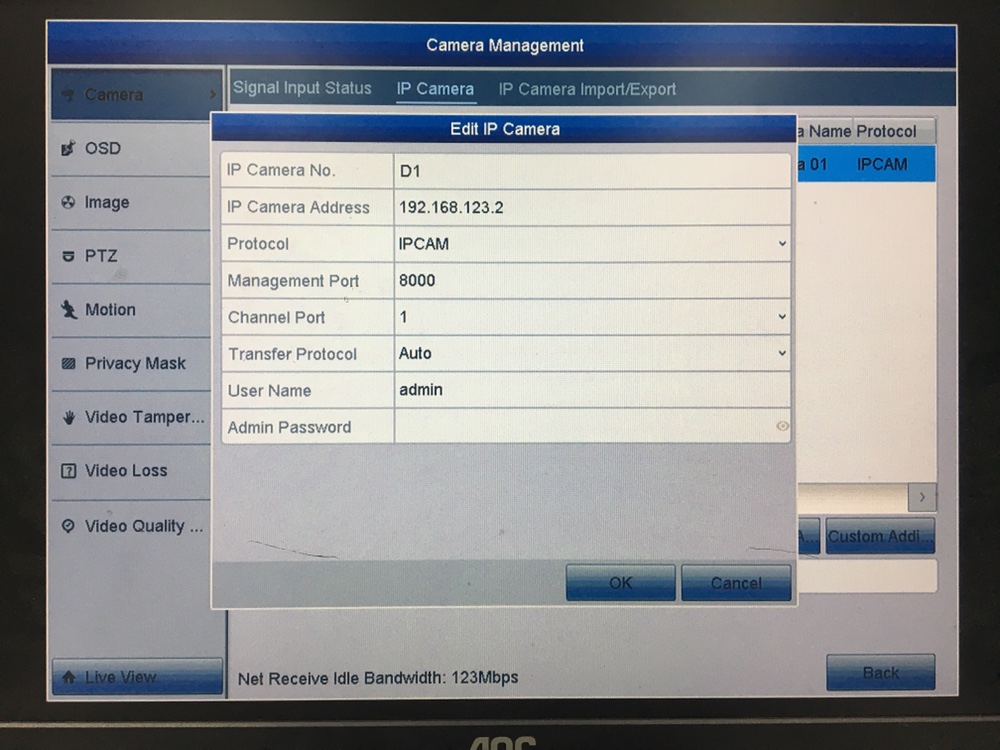
- Choose an IP camera and click the
 icon to edit the parameters. You can edit the IP address, protocol, and other parameters.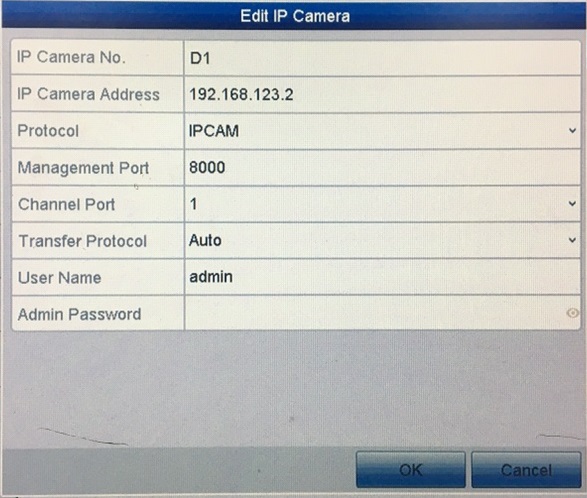
IP Camera address: The IP Camera connected well will automatically assign an IP address.
Protocol: The default protocol is IPCAM, you can change from the drop-list.
Management Port: The default management is 8000.
Channel-Port: If the connected device is an encoding device with multiple channels, you can choose the channel to connect by selecting the channel port No. in the dropdown list.
Transfer Protocol: You can choose Auto or Manual for the transfer protocol.
If you want to change the info, you should input the Admin Password. - Click OK to save the settings and exit the editing interface.
Was this article helpful?
Bu bilgiler sorununuzu çözmeye yardımcı oldu mu?
Thanks for your feedback!
Still need help?
Uzman ekibimiz size yardımcı olmak için burada.