Annke Vision - Configuring HTTP Port and Server Ports on ANNKE DVR/NVR
20 Aug 2026
469 views
Applies to: N48PI/N44PI/N46PI/N44PAM/N48PAW/N46PCK/N88PCH/N441Y/N481Y/DT41Y/DT61Y/DT81Y/DN41R/DN61R/DN81R/DT41GB/DT81GB/DT61GB/DT41DB/DT81DB/DT61EQ/DW41JD/DW81KD/DW61LD/DT81DP
Purpose:
You can change the Server and HTTP ports in the Network Settings menu. The default server port is 8000 and the default HTTP port is 80.
Before you start:
- You have logged in to your NVR.
- Click Menu > Configuration > Network > NAT.
Steps:
-
Enter into the NAT page.
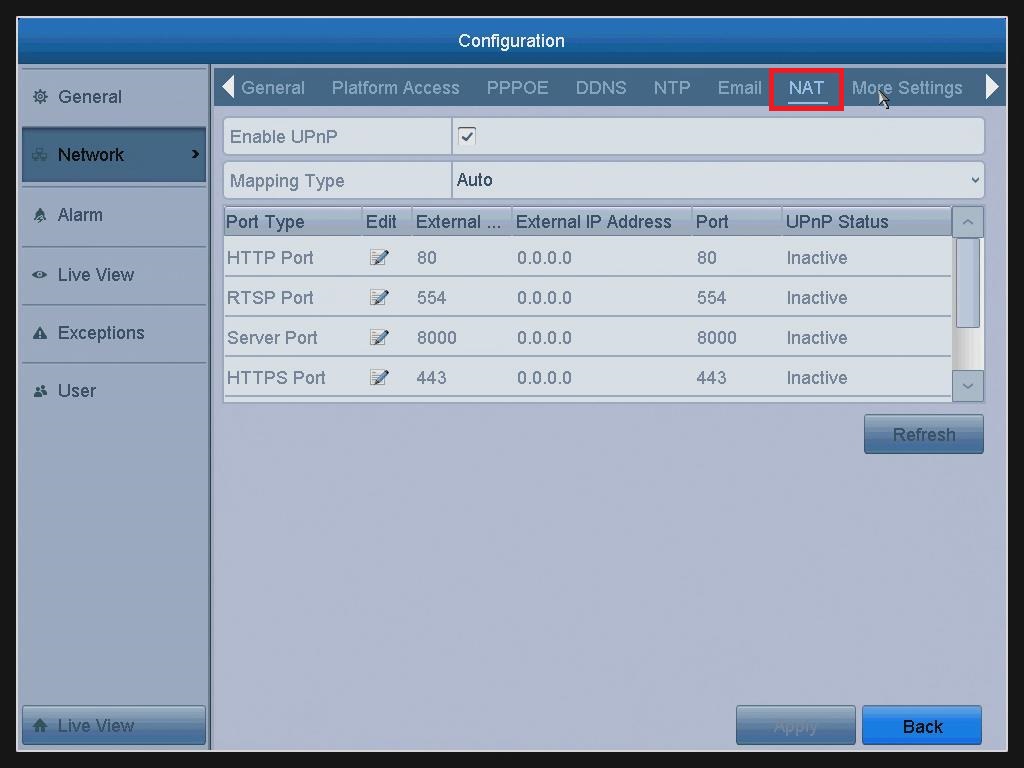
- Enter the Server Port and HTTP Port in the text fields.
The default Server Port is 8000 and the HTTP Port is 80, and you can change them according to different requirements.
Note: The Server Port should be set to the range of 2000-65535 and it is used for remote client software access. The HTTP port is used for remote web browser access.
3. Click the Apply button to save and exit the interface.
Was this article helpful?
Bu bilgiler sorununuzu çözmeye yardımcı oldu mu?
Thanks for your feedback!
Still need help?
Uzman ekibimiz size yardımcı olmak için burada.