Annke Vision - Checking Network Traffic on Annke DVR/NVR
20 Aug 2026
410 views
Applies to:
DT41Y/DT61Y/DT81Y/DN41R/DN61R/DN81R/DT41GB/DT81GB/DT61GB/DT41DB/DT81DB/DT61EQ/DT81DP/N48PI/N44PI/N46PI/N44PAM/N88PCH/N441Y/N481Y/S500/S300/FC200/NCK800/H800/H500
Purpose:
You can check the network traffic to obtain real-time information on DVR such as linking status, MTU, sending/receiving rate, etc.
Before you start:
- You should log in to your device.
- Ensure that the network status remains stable.
- Click Menu > Maintenance > Net Detect.
Steps:
-
Click the Traffic tab to enter the Traffic Detection interface.
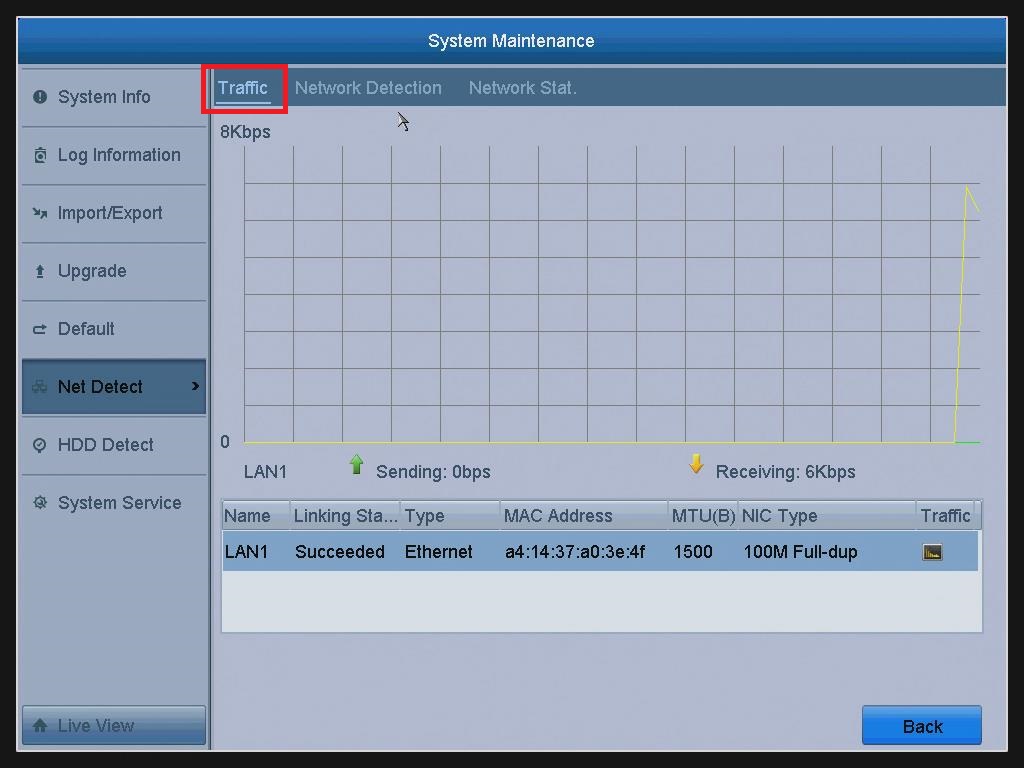
- You can view the sending rate and receiving rate information on the interface. The traffic data is refreshed every 1 second.
Was this article helpful?
Bu bilgiler sorununuzu çözmeye yardımcı oldu mu?
Thanks for your feedback!
Still need help?
Uzman ekibimiz size yardımcı olmak için burada.