Annke Vision - Checking Network Status/Statistics on Annke DVR/NVR
20 Aug 2026
405 views
Applies to:
DT41Y/DT61Y/DT81Y/DN41R/DN61R/DN81R/DT41GB/DT81GB/DT61GB/DT41DB/DT81DB/DT61EQ/DW41JD/DW81KD/DW61LD/DT81DP/N48PI/N44PI/N46PI/N44PAM/N48PAW/N46PCK/N88PCH/N441Y/N481Y
Purpose:
You can check the network statistics to obtain real-time information of the device.
Before you start:
- You should log in to your DVR/NVR.
- Click Menu >System Maintenance >Net Detect.
Steps:
-
Enter the Net Detect interface and then click the Network Stat.
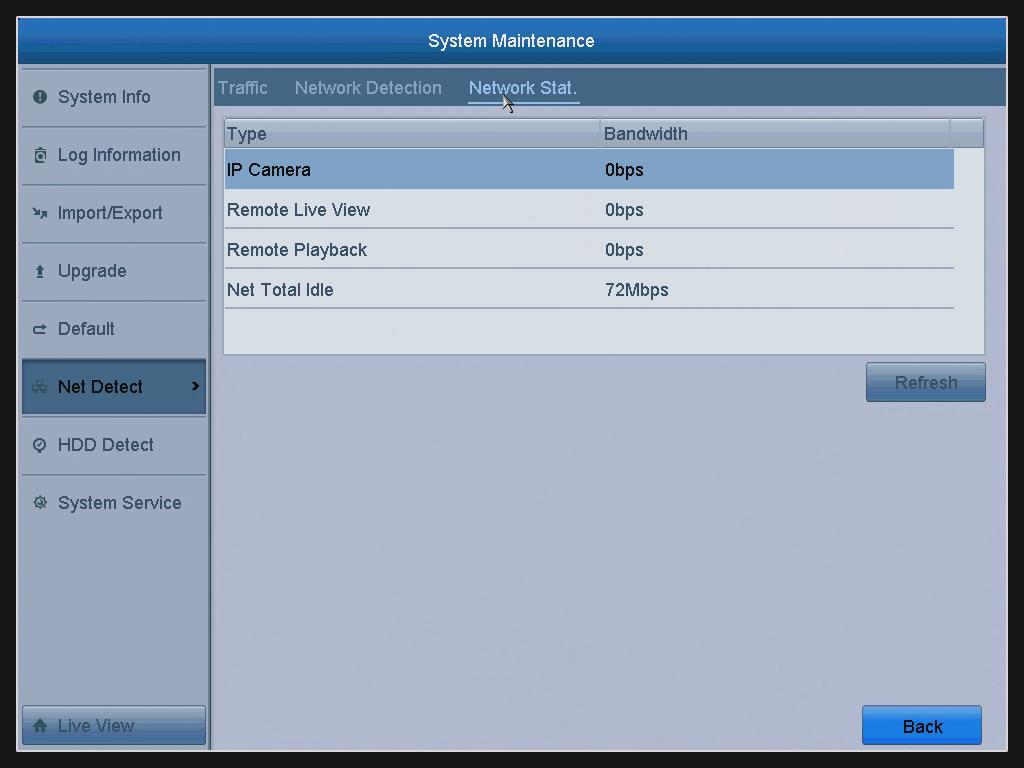
- You can view the statistics about the bandwidth of IP Camera, Remote Live View, Remote Playback, and Net Total Idle.
- Click the Refresh button to get the latest bandwidth statistics.
Was this article helpful?
Bu bilgiler sorununuzu çözmeye yardımcı oldu mu?
Thanks for your feedback!
Still need help?
Uzman ekibimiz size yardımcı olmak için burada.