Annke Vision - Change Password on Annke Vision APP
20 Aug 2026
405 views
Applies to: DT41Y/DT61Y/DT81Y/DN41R/DN61R/DN81R/DT41GB/DT81GB/DT61GB/DT41DB/DT81DB/DT61EQ/DW41JD/DW81KD/DW61LD/DT81DP/N48PI/N44PI/N46PI/N44PAM/N48PAW/N46PCK/N88PCH/N441Y/N481Y/I21AE/I21AF/I41DQ/I61DQ/I61DR/I61DS/S500/S300/FC200/NCK800/H800/H500
Purpose: You can change your app account password.
Before you start:
Run the App, and have logged in the account before operating the function.
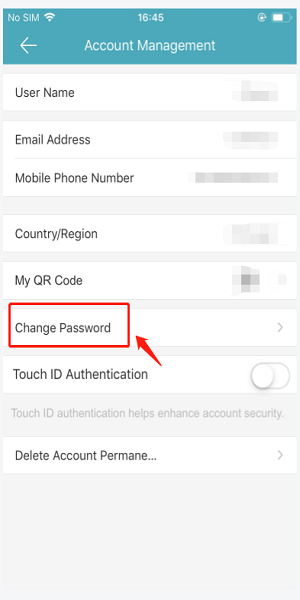
Click More Page>Account Management>Change Password.
Here are the steps:
1. Go to the APP Account, and input the old password on the Change Password page.
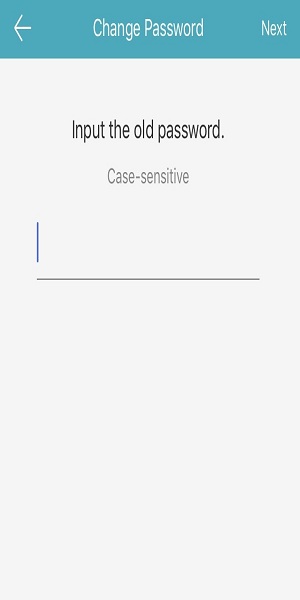
2. Input a new password.
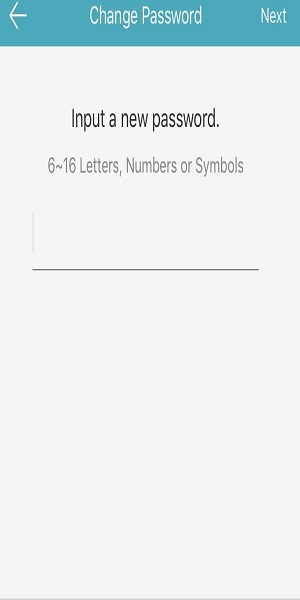
Note: The password includes 6~16 letters, numbers, or symbols, we highly recommend using a strong password.
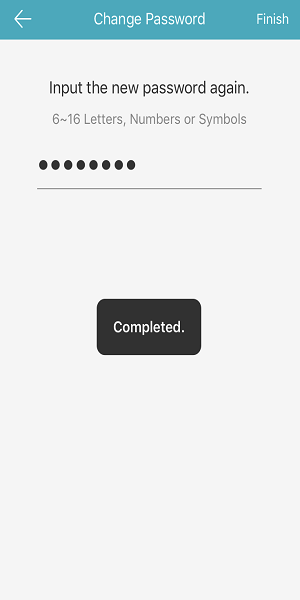
3. Input the new password again and tap Finish to complete it.
Was this article helpful?
Bu bilgiler sorununuzu çözmeye yardımcı oldu mu?
Thanks for your feedback!
Still need help?
Uzman ekibimiz size yardımcı olmak için burada.