Annke Vision - Brief Introduction for Young/Soter DVR
20 Aug 2026
395 views
Applies to: DN41R/DN61R/DN81R/DW41JD/DW81JD/DW61JD
1. Front Panel 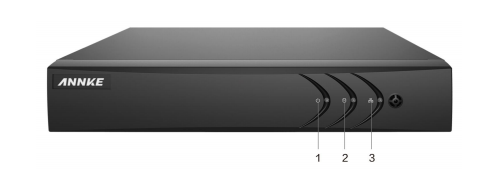
| No. | Icon | Description |
| 1 |  |
Turns green when DVR is powered up. |
| 2 |  |
Turns red when DVR is being read from or written to HDD. |
| 3 |  |
Flickers green when the network connection is functioning properly. |
2. Rear Panel 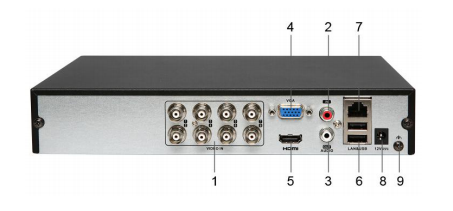
| No. | Item | Description |
| 1 | VIDEO IN | BNC interface for TVI and analog video input. |
| 2 | AUDIO IN | RCA connector |
| 3 | AUDIO OUT | RCA connector |
| 4 | VGA | DB15 connector for VGA output. Display local video output and menu. |
| 5 | HDMI | HDMI video output connector. |
| 6 | USB Port | Universal Serial Bus (USB) port for additional devices. |
| 7 | Network Interface | Connector for network |
| 8 | Power Supply | 12V DC power supply. |
| 9 | GND | Ground |
Note: The rear panel is various according to different models. Please refer to the actual product. The figure is for reference only.
Was this article helpful?
Bu bilgiler sorununuzu çözmeye yardımcı oldu mu?
Thanks for your feedback!
Still need help?
Uzman ekibimiz size yardımcı olmak için burada.