Annke Vision - Bad Sector Detection on Annke DVR/NVR
20 Aug 2026
379 views
Applies to: DT41Y/DT61Y/DT81Y/DN41R/DN61R/DN81R/DT41GB/DT81GB/DT61GB/DT41DB/DT81DB/DT61EQ//DW41JD/DW81KD/DW61LD/DT81DP/N48PI/N44PI/N46PI/N44PAM/N48PAW/N46PCK/N88PCH/N441Y/N481Y/S500/S300/FC200/NCK800/H800/H500
Purpose: You can detect the bad sector of the HDD to check the status of the HDD.
Before you start:
- You have installed an HDD to your DVR/NVR.
- You have logged in to your device.
- Click Menu > Maintenance > HDD Detect.
Steps:
1. Click the Bad Sector Detection tab to enter the interface.
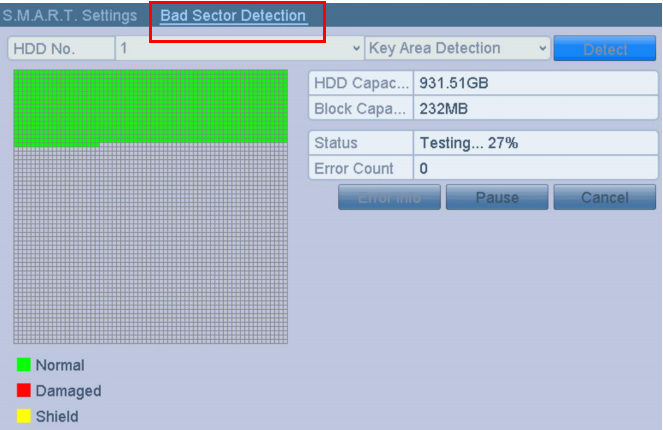
2. Select the HDD No. in the dropdown list you want to configure, and choose All Detection or Key Area Detection as the detection type.
3. Click the Detect button to start the detection.
Notes:
- Error info: to see the detailed damage information.
- Pause: pause the detection.
- Cancel: cancel the detection.
Was this article helpful?
Bu bilgiler sorununuzu çözmeye yardımcı oldu mu?
Thanks for your feedback!
Still need help?
Uzman ekibimiz size yardımcı olmak için burada.