Annke Vision - Adding Device to Annke Vision App - Introduction
20 Aug 2026
393 views
Applies to: DT41Y/DT61Y/DT81Y/DN41R/DN61R/DN81R/DT41GB/DT81GB/DT61GB/DT41DB/DT81DB/DT61EQ/DW41JD/DW81KD/DW61LD/DT81DP/N48PI/N44PI/N46PI/N44PAM/N48PAW/N46PCK/N88PCH/N441Y/N481Y/S500/S300/FC200/NCK800/H800/H500
Purpose: You can add the Annke Vision device or the local device to the app.
Note:
The Annke Vision devices refer to the devices added to the Annke Vision server.
The Local devices refer to the devices added to the app via IP/Domain directly.
The Annke Vision devices refer to the devices added to the Annke Vision server.
The Local devices refer to the devices added to the app via IP/Domain directly.
Before you start:
- Activate your device before adding it.
- Make sure the device is powered on.
- You have logged in to your account.
Steps:
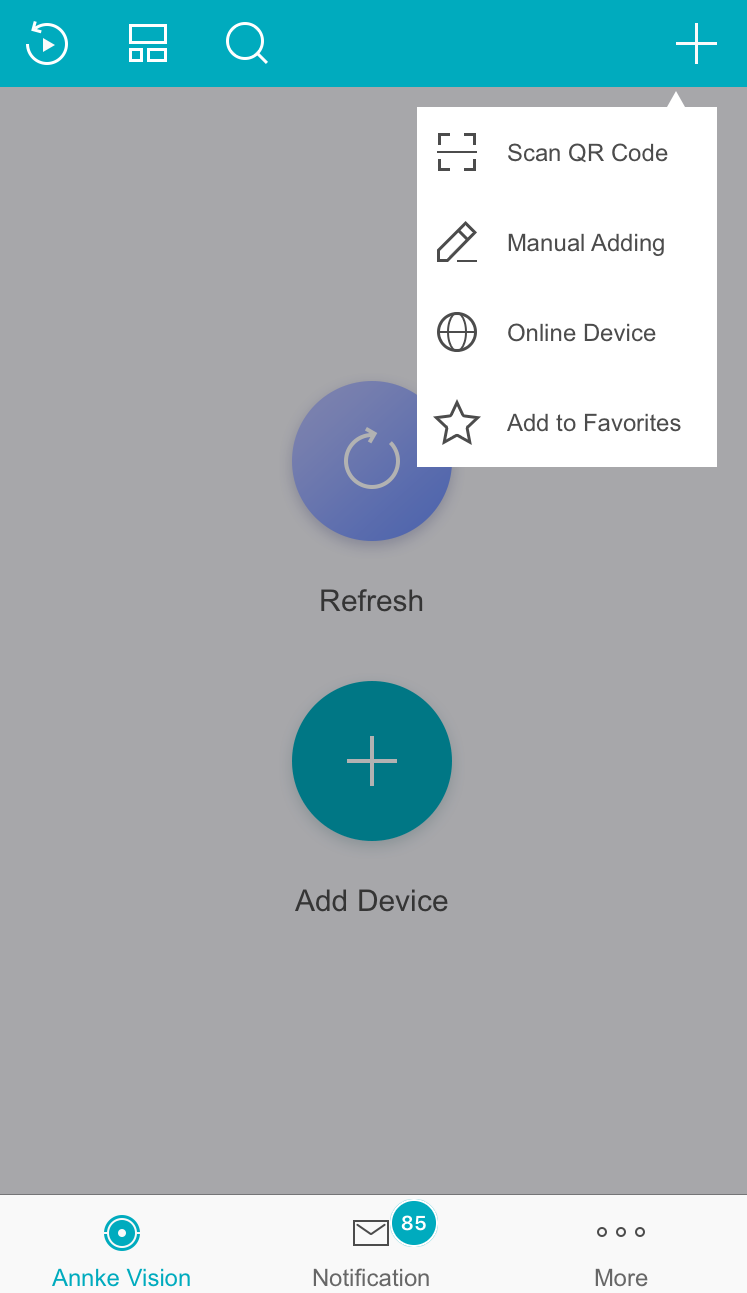
- Tap Annke Vision at the bottom of the page to enter the Annke Vision page.
- On the Annke Vision page, tap the icon
 at the upper-right corner.
You can add a device by below ways:
Was this article helpful?
Bu bilgiler sorununuzu çözmeye yardımcı oldu mu?
Thanks for your feedback!
Still need help?
Uzman ekibimiz size yardımcı olmak için burada.