Annke Sight - How to Pair the Cameras with the Base Station?
Applies to N44WBF+I41GF
Usually, the system is plug-and-play. But if you add additional cameras to the base station, the cameras require to pair with the base station, or the cameras won't build up the connection with the base station.
Before you start, please power on the base station and the camera and put them next to each other. If the camera is powered on, the red infrared lights will be lit up as below picture: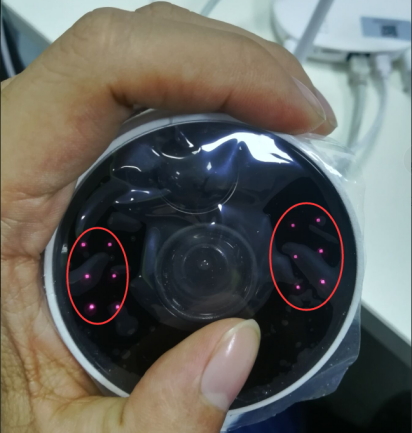
Below are the steps about pairing the cameras with the base station:
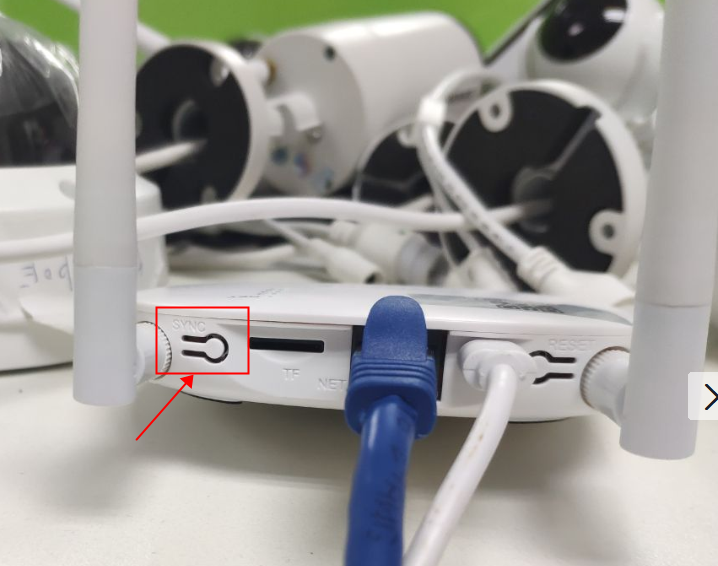
1. Push the SYNC button for about 5 seconds on the base station until you hear the voice from the base station.
2. Then, push the reset button of the camera for about 1 second until you hear the voice "wireless setting, please wait for the camera".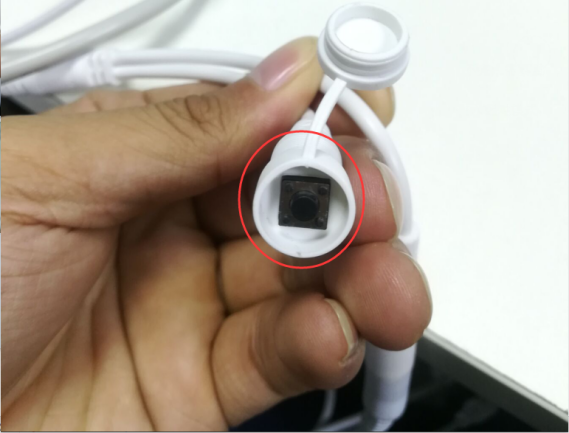
3. After about 10 seconds, the base station and the camera will be connected with each other successfully, and the lights will be lit up on the white box. If you have 4 cameras and all of them are connected with the base station, all 4 lights will be lit up.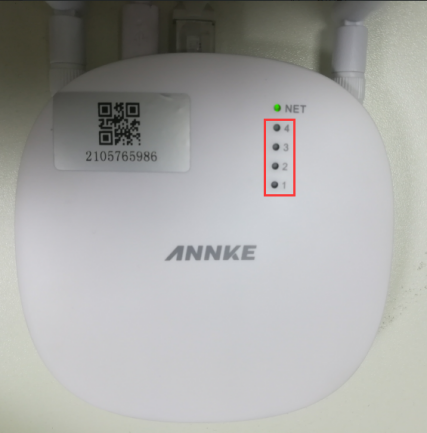
Was this article helpful?
Bu bilgiler sorununuzu çözmeye yardımcı oldu mu?
Still need help?
Uzman ekibimiz size yardımcı olmak için burada.