
New Dahua NVR Firmware 2021
The latest firmware will normally include updates to features and settings and remove any bugs identified in previous versions.Firmware upgrades ensure that you have latest security updates to help protect your devices. If you haven’t already done so, on completion of an upgrade please refer to the Best Practice Information section, to ensure maximum security for your networked device.
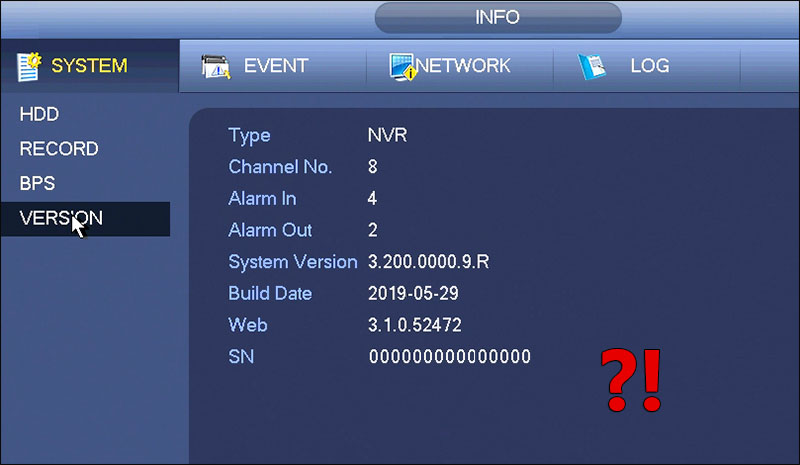
2. Find your devices part number in the list below and compare the version number and build date of the firmware.
If your version number or build date is older than the list, please download the latest firmware. Once you have downloaded the latest firmware follow the relevant update instructions below.
Firmware that has a build date of April 2017 or later may include some important changes to device security and firmware update implementation. It is highly recommended that you take the time to read the following two guides Dahua Security Guide & Online Update Notice.
| HDCVI XVR's | Version Number | Build Date | |||
|---|---|---|---|---|---|
| XVR5104C | V3.218.0000002.5.R | 01/03/2019 | Download | ||
| XVR5104C-S2 | V3.218.0000002.5.R | 01/03/2019 | Download | ||
| XVR5104HS | V3.218.0000002.5.R | 01/03/2019 | Download | ||
| XVR5104AN-4M | V3.218.0000002.3.R | 01/06/2018 | Download | ||
| XVR5104C-X | V4.001.0000000.9.R | 18/09/2020 | Download | ||
| XVR5104HS-X | V4.001.0000000.9.R | 18/09/2020 | Download | ||
| XVR5104H-4KL-X | V4.001.0000000.9.R | 18/09/2020 | Download | ||
| XVR7104HE-4KL-X | V4.001.0000000.9.R | 18/09/2020 | Download | ||
| XVR5108C | V3.218.0000002.5.R | 01/03/2019 | Download | ||
| XVR5108HS | V3.218.0000002.5.R | 01/03/2019 | Download | ||
| XVR5108HS-S2 | V3.218.0000002.5.R | 01/03/2019 | Download | ||
| XVR5108H-4KL-X | V4.001.0000000.9.R | 18/09/2020 | Download | ||
| XVR5208AN-4KL-X | V4.001.0000000.9.R | 18/09/2020 | Download | ||
| XVR7208A-4K-X | V4.001.0000000.9.R | 18/09/2020 | Download | ||
| XVR7208A-4KL-X | V4.001.0000000.9.R | 18/09/2020 | Download | ||
| XVR5216A | V3.218.0000002.5.R | 01/03/2019 | Download | ||
| XVR5216A-S2 | V3.218.0000002.5.R | 01/03/2019 | Download | ||
| XVR5216AN-4KL | V3.218.0000002.5.R | 01/03/2019 | Download | ||
| XVR5416L | V3.218.0000002.5.R | 01/03/2019 | Download | ||
| XVR5116HS-X | V4.001.0000000.9.R | 18/09/2020 | Download | ||
| XVR5216A-X | V4.001.0000000.9.R | 18/09/2020 | Download | ||
| XVR5216AN-4KL-X | V4.001.0000000.9.R | 18/09/2020 | Download | ||
| XVR5832S | V3.218.0000002.5.R | 01/03/2019 | Download | ||
| XVR5432L-X | V4.001.0000000.9.R | 18/09/2020 | Download | ||
| XVR5832S-X | V4.001.0000000.9.R | 18/09/2020 | Download | ||
| XVR7416L | V3.218.0000002.5.R | 01/03/2019 | Download | ||
| XVR7216A-4KL-X | V4.001.0000000.9.R | 18/09/2020 | Download | ||
| XVR7416L-4KL-X | V4.001.0000000.9.R | 18/09/2020 | Download | ||
| XVR7816S-4KL-X | V4.001.0000000.9.R | 18/09/2020 | Download | ||
| HDCVI DVRS | Version No | Build Date | Link |
|---|---|---|---|
| HCVR5104C-S2 | V3.200.0004.13.R | 21/10/2017 | Download |
| HCVR5104C-S3 | V3.218.0000002.5.R | 01/03/2019 | Download |
| HCVR5104H-S2 | V3.200.0004.13.R | 21/10/2017 | Download |
| HCVR5104HS-S3 | V3.218.0000002.5.R | 01/03/2019 | Download |
| HCVR5108C-S2 | V3.200.0004.13.R | 21/10/2017 | Download |
| HCVR5108C-S3 | V3.218.0000002.5.R | 01/03/2019 | Download |
| HCVR5108H-S2 | V3.200.0004.13.R | 21/10/2017 | Download |
| HCVR5108HS-S3 | V3.200.0000002.5.R | 01/03/2019 | Download |
| HCVR5216A-S2 | V3.200.0004.13.R | 21/10/2017 | Download |
| HCVR5216A-S3 | V3.218.0000002.5.R | 01/03/2019 | Download |
| HCVR5416L-V2 | V3.200.0004.13.R | 21/10/2017 | Download |
| HCVR5832S-S2 | V3.210.0001.1.R | 21/10/2017 | Download |
| HCVR7204A-V2 | V3.200.0004.13.R | 21/10/2017 | Download |
| HCVR7204A-S2 | V3.200.0004.13.R | 21/10/2017 | Download |
| HCVR7204A-S3 | V3.218.0000002.3.R | 21/10/2017 | Download |
| HCVR7104H-4K | V3.218.0000002.3.R | 01/06/2018 | Download |
| HCVR7208A-V2 | V3.200.0004.13.R | 21/10/2017 | Download |
| HCVR7208A-S3 | V3.218.0000002.3.R | 01/06/2018 | Download |
| HCVR7208AN-4K | V3.218.0000002.5.R | 01/03/2019 | Download |
| HCVR7416L | V3.210.0001.1.R | 21/10/2017 | Download |
| HCVR7816S | V3.210.0001.1.R | 21/10/2017 | Download |
| IP NVRs |
Version Number |
Build Date |
Link |
|---|---|---|---|
| NVR104-P |
V.3.200.0000.0.R. |
31/03/2017 |
|
| NVR1104H-P |
V3.200.0000.0.R. |
31/03/2017 |
|
| NVR1104-P |
V3.200.0000.0.R. |
31/03/2017 |
|
| NVR2104HS-P-S2 |
V3.205.0000000.0.R. |
13/10/2017 |
|
| NVR2104-P-S2 |
V3.205.0000000.0.R. |
13/10/2017 |
|
| NVR2104-P-4KS2 |
V4.001.0000003.2.R. |
17/09/2020 | |
| NVR2104HS-P-4KS2 |
V4.001.0000003.2.R. |
17/09/2020 |
|
| NVR4104H-P |
V3.201.0000.1.R. |
09/04/2016 |
|
| NVR4104HS-P-4KS2 |
V4.001.0000003.1.R. |
13/08/2020 | |
| NVR4208-8P |
V3.201.0000.1.R. |
09/04/2016 |
|
| NVR4208-8P-4K |
V3.210.0002.0.T. |
15/10/2015 |
|
| NVR4208-8P-4KS2 |
V4.001.0000003.1.R. |
13/08/2020 | |
| NVR4216-8P |
V3.201.0000.1.R. |
09/04/2016 |
|
| NVR4416-16P |
V3.201.0000.1.R. |
09/04/2016 |
|
| NVR4416-16P-4K |
V3.210.0002.0.T. |
15/10/2015 |
|
| NVR4416-16P-4KS2 |
V4.001.0000003.1.R. |
13/08/2020 |
|
| NVR4832 |
V3.201.0000.1.R. |
09/04/2016 |
|
| NVR4832-4KS2 |
V4.001.0000003.1.R. |
13/08/2020 | |
| NVR5208-8P-4KS2 |
V4.001.0000003.1.R. |
13/08/2020 | |
| NVR5416-16P-4KS2 |
V4.001.0000003.1.R. |
13/08/2020 |
|
| NVR5864-4KS2 |
V4.001.0000003.1.R. |
13/08/2020 |
|
| NVR6000 |
V3.210.0003.0.R. |
14/07/2016 |
|
| NVR608-128-4K |
V3.210.0003.0.R. |
14/07/2016 |
|
| NVR608-32-4K |
V3.210.0003.0.R. |
14/07/2016 |
|
| NVR608-32-4KS2 |
V4.001.0000001.1.R |
12/08/2020 |
|
| NVR608-64-4K |
V3.210.0003.0R |
14/07/2016 |
|
| NVR616-128-4KS2 | V4.001.0000001.1.R | 12/08/2020 | Download |
| NVR724-256 | V3.210.0003.0R | 14/07/2016 | Download |
| NVR7832 | V3.200.0000.1.R | 22/11/2017 | Download |
| NVR7864 | V3.200.000.1.R | 22/11/2017 | Download |
| Nexus NVR's | Version No | Build Date | |
|---|---|---|---|
| IP-NVR04P | V3.201.0000.1.R | 09/04/2016 | Download |
| IP-NVR08P | V3.201.0000.1.R | 09/04/2016 | Download |
| IP-NVR16P | V3.201.0000.1.R | 09/04/2016 | Download |
| IP-NVR32 | V3.200.0000.1.R | 22/11/2017 | Download |
| IP-NVR64 | V3.200.0000.1.R | 22/11/2017 | Download |
| IP-NVR128 | V3.210.0003.0.R | 14/07/2016 | Download |
| IP-NVR256 | V3.210.0003.0R | 14/07/2016 | Download |
3a. Update via USB (Recommended)
It is recommended that the following steps are carried out by a CCTV engineer
- Copy downloaded firmware to a USB stick
- Log into the menu of the recorder (Right Click > Main Menu) using your login credentials
- Insert the USB stick into a USB port on your recorder
- After a few seconds, a pop up should appear
- Click the System Upgrade option
- The Upgrade menu should now be displayed, click the Upgrade button
- Locate the firmware file and click to select it
- Click Start or Upgrade to begin the upgrade process
- The recorder will restart as part of the upgrade process, once the recorder has rebooted up the update is complete
- Log into the menu of the recorder (Right Click > Main Menu) using your login credentials
- Go to System (info) > Version and compare the build date to the one you wrote down. The build date shown should be a newer date.
- Review all the recorder settings and reprogramme where required.
It is recommended that the following steps are carried out by a CCTV engineer
- Locate the firmware file on your computer (usually your downloads folder or desktop) and make a note of the location
- Enter the NVR/DVR IP address or domain name in the Internet Explorer address bar
- Log into the NVR/DVR using your username and password
- Click the Setup Tab > Settings > Upgrade and browse to the file path of the downloaded firmware file
- Select the firmware file and Click Open
- Click the Upgrade button to start the upgrade process
- The unit will reboot after the upgrade, close Internet Explorer and then re-open it
- Enter the NVR/DVR IP address or domain name in the Internet Explorer address bar
- Log into the NVR/DVR using your username and password
- If prompted, install the web plugin click install and follow the installation wizard
- Go to System (info) > Version and compare the build date to the one you wrote down. The build date shown should be a newer date
- Review all the recorder settings and reprogramme where required.
It is recommended that the following steps are carried out by a CCTV engineer
- Locate the firmware file on your computer (usually your downloads folder or desktop) and make a note of the location
- Open Smart PSS
- Click on Device CFG
- Select the unit requiring the update
- Click Upgrade and browse to the file path of the downloaded firmware file
- Select the firmware file and click Open
- Click the firmware upgrade button to start the upgrade process
- Smart PSS may take up to 10 minutes to update the firmware
- The update is complete when the build date shown updates to the new version
- Review all the recorder settings and reprogramme where required.
Advertisement

Did this security guide help you?
Rate this article to help fellow engineers find the best guides.

Written by
Alex Vance
Senior Security Systems Architect & IoT Consultant with over 15 years in digital surveillance design.



Discussion (0)
No comments yet. Be the first to share your thoughts!
Leave a Comment