
How to upgrade a device xmeye
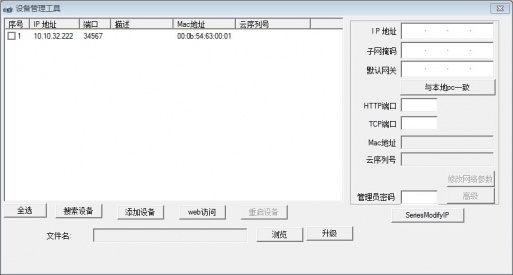
Local upgrade operation method
1. Put the download erstlet into the USB stick, the USB stick plugs into the video recorder
It is best to put only one program in order to avoid conflict
2. Find system upgrade function on the video recorder
Click Order: Main Menu — Management Tools — System Upgrades
 —>
—> —>
—>
3. Option Chinese point upgrade

Where to upgrade the default, do not need to modify, and so prompt upgrade success can be
Upgrade tool upgrade
Instructions for action
- Double-click
 open tool, click search for IP address


2. Check the device, click browse the selection program, point upgrade

3. Such as prompt upgrade success can be, upgrade process do not lose power
Note: If the upgrade fails, it may be the cause. Device IP and computer different network segments or programs do not match the device model
Cms Upgrade
CMS upgrade must be an IP address added device to be allowed
- Right-click on the preview screen to select the device configuration

2. Select the management tool icon in the device configuration, select the system upgrade

3. Point browse selecter, point upgrade, wait for prompt upgrade can be successful, during the time do not power down

Note: If the upgrade fails, please confirm that the computer and monitoring device are in the same network segment or whether the program model corresponds to the device

Did this security guide help you?
Rate this article to help fellow engineers find the best guides.

Alex Vance
Senior Security Systems Architect & IoT Consultant with over 15 years in digital surveillance design.
Discussion (0)
No comments yet. Be the first to share your thoughts!
Leave a Comment